Cricut Joy 2 Review: Worth It? (October 2026)
In this Cricut Joy 2 review, the Joy 2 is the right fit for small cards, labels, decals and full-color stickers, especially when storage space is limited. Choose a wider cutter if larger designs or project batches are part of your regular plans.

On this page (11 sections)
- Cricut Joy 2 review: who should choose it?
- What does the Cricut Joy 2 do?
- How should you choose the right Cricut size?
- How do you set up a first Cricut Joy 2 project?
- What care and use habits help avoid mistakes?
- Is Cricut Joy 2 good for printable stickers?
- Cricut Joy 2 vs Joy Xtra: which one fits?
- When should you choose a wider cutter?
- Which alternatives suit different craft plans?
- What are the Cricut Joy 2's main pros and cons?
- Is the Cricut Joy 2 the right buy for you?
The Cricut Joy 2 is a compact cutter for small, everyday crafts, including custom cards, simple decals, labels and full-color stickers. This Cricut Joy 2 review looks at who will get the most from its 4.5 in cutting width, how to set up a first project and when a wider machine makes more sense.
It works with 75+ materials and can cut, write, draw, foil and score. The Essential Bundle includes tools and materials for up to 35 projects, so it's a practical starting point if those supplies match what you plan to make.
Cricut Joy 2 review: who should choose it?
Choose the Cricut Joy 2 if you mostly make small projects and need a cutter that is easy to store. It suits card makers, label makers and occasional crafters who want to personalize items without giving a wider machine permanent counter space.
Its 4.5 in cutting width and 4.5 x 6.5 in active surface area are useful limits to check against your designs. A small decal or card detail can fit comfortably, while a broad shirt graphic or wall design may need resizing or a different machine.
The machine weighs just over 2 lb, which helps if you move craft supplies between a shelf and a work surface. Its compact size is less useful if you plan to keep a machine set up and cut large projects often.
The Essential Bundle includes Smart Vinyl, Smart Iron-On, Value Cardstock, Insert Card Sets and Printable Vinyl. Cricut says these supplies can support up to 35 projects, and the package adds 25 images and 1 font.
Choose the bundle if you want to try several of those materials right away. If you already have a full supply drawer, focus on the machine and check whether the included materials would add useful variety.
Skip the Joy 2 if your regular designs need more than its available cutting area, or if you expect to make batches of wide items. A 12 in machine such as the Explore 5 is better suited to that work.
What does the Cricut Joy 2 do?
The Joy 2 cuts, writes, draws, foils and scores, and it works with materials such as vinyl, iron-on, printable materials and cardstock. Those functions cover common projects like labels, card details, small decals and stickers.
For full-color sticker projects, print the design with a home inkjet printer first. The Joy 2 then recognizes the printed image and cuts around it, while the printer supplies the color.
Design Space is the app used to create and send projects. It connects to the machine over Bluetooth from a compatible mobile or desktop device, and Cricut describes its free library as including images, fonts and projects.
Some digital content can be bought individually, while Cricut Access is an optional paid subscription for more content and features. Check what is available without a subscription before building your project plans around a particular image or tool.
How should you choose the right Cricut size?
Start with the widest design you expect to make regularly, then decide whether portability or room to grow matters more. A compact machine is a good fit when the projects stay small; a wider model saves workarounds when they do not.
Before you buy, measure a few real projects such as your largest card, label sheet or decal. Check the design against the machine's cutting width and active area, and leave room for the material and tools you will handle.
The Joy 2's width can be a benefit when you make short runs of small designs. It can become a constraint when you want a wide graphic, several designs arranged together or a larger apparel project.
If you need help matching a mat to a project, see the Cricut mat size guide. For cardstock decisions, our guide to cutting cardstock with a Cricut covers common material and design considerations.
How do you set up a first Cricut Joy 2 project?
Set up the Joy 2 by connecting a compatible phone, tablet or computer to Design Space over Bluetooth, then choose a simple project and a compatible material. The app guides you through preparing the design and sending it to the cutter.
For a first project, choose a small card, label or uncomplicated decal. A simple design makes it easier to learn how the material sits, how the cut is arranged and how the finished piece comes away.
Check the material and tool requirements before starting. Some tools and accessories are sold separately, so confirm that the project uses equipment you have rather than assuming every feature is ready with the machine.
For a printable sticker, make sure the artwork fits the Joy 2's cutting area and that your inkjet printer can feed the chosen printable material. Print first, then follow the current Design Space instructions for recognition and cutting.
Design Space requires a compatible device, Bluetooth and high-speed internet. If the app or connection is not ready, finish that setup before preparing material so you do not have to leave a project waiting mid-process.
What care and use habits help avoid mistakes?
Use a material and tool that match the project, and check the cut settings and design size before sending a job. A small cutter rewards careful preparation because a design near its width limit leaves less room for adjustment.
Common mistakes include choosing artwork wider than the cutting area, assuming a printer creates the cut, and starting with a complex design before learning the basic workflow. The printer adds color; the Joy 2 handles the cut around the printed design.
Another easy mistake is treating the bundle's project count as a promise for every design. The materials can go farther on small projects than on large ones, so plan around the actual size and number of pieces you want to make.
Keep the materials and accessories organized between projects, and check current Cricut guidance for compatible materials and tools. That makes it easier to pick up where you left off and avoid mixing supplies intended for different jobs.
Is Cricut Joy 2 good for printable stickers?
Yes, the Joy 2 can cut around designs printed with a home inkjet printer, making it suitable for small full-color stickers and decals. This is a useful reason to choose it if you already have an inkjet printer and your designs fit its cutting area.
The process has two parts: print the artwork, then use Design Space and the cutter to detect and cut around it. Check that the printer can feed the material and that the full design fits before printing.
The Cricut Joy Xtra also supports Print-Then-Cut with most inkjet printers. If printable work is your main reason for buying, compare both machines' project sizes and the supplies included in their bundles.
Cricut Joy 2 vs Joy Xtra: which one fits?
Choose the Joy 2 when its stated 4.5 in width and Essential Bundle suit your small projects. Choose the Joy Xtra if you value its bundle's Fine Point Pen and Mini Weeder or its stated support for Print-Then-Cut with most inkjet printers.
The Joy Xtra works with 50+ materials and includes 30 bonus images. The Joy 2 works with 75+ materials and its bundle includes a wider mix of materials for getting started.
Cricut does not state the Joy Xtra's cutting width here, so confirm its current project limits before buying for a specific design size. Our Cricut Joy Xtra vs Explore 5 comparison considers the compact option alongside a wider Cricut.
When should you choose a wider cutter?
Choose a wider cutter if your projects regularly exceed the Joy 2's available area or you want to make more pieces in one go. The Cricut Explore 5 has a 12 in cutting width and works with 100+ materials.
Its Essential Bundle includes supplies for up to 65 projects. That makes it a stronger match for larger decals, personalized apparel and repeated projects, while its larger footprint is a tradeoff for a small craft space.
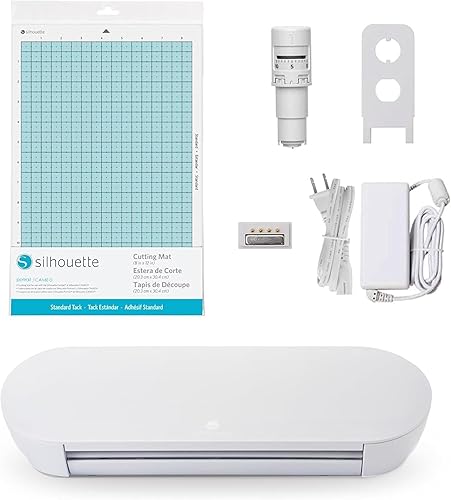
A different software workflow may also guide your choice. The Silhouette Portrait 4 is a 9 in vinyl cutter with Studio software and electric tool options, so it can suit someone interested in exploring Silhouette tools.
The craft cutting machine guide explains how project size and machine type affect your choice. For more options, compare our best electronic die cutting machines.
Which alternatives suit different craft plans?
The Explore 5 suits larger designs and batches, the Joy Xtra suits buyers who want its inkjet sticker workflow and included tools, and the Portrait 4 suits buyers who want to explore Silhouette software. Compare the actual project size and workflow you expect to use before choosing.
Cricut Explore 5 Essential
The Explore 5 is the clearest step up when the Joy 2's cutting area feels too small. Its 12 in cutting width and support for 100+ materials give you more room for larger designs and projects in multiples.
Cricut Explore 5 Essential: Best for larger batches

- 12 in cutting width
- Works with 100+ materials
- Bundle supplies for up to 65 projects
A full-width option for larger decals, apparel and making projects in multiples. Its 12 in cutting width gives you more room than the Joy 2.
Pros
- 12 in cutting width
- Works with 100+ materials
- Can write, draw, foil, score and cut
- Bundle includes supplies for up to 65 projects
Cons
- Larger than the Joy 2
- Some tools and accessories are sold separately
Cricut Joy Xtra
The Joy Xtra makes sense if you want Print-Then-Cut support with most inkjet printers and a compact Cricut bundle that includes a pen and mini weeder. Confirm its cutting width and project limits for your intended designs.
Cricut Joy Xtra: Best for inkjet stickers

- Works with 50+ materials
- Print-Then-Cut with most inkjet printers
- Cuts, writes, draws and foils
A compact Cricut alternative when printable stickers and a wider range of small projects matter. The bundle includes a pen, mini weeder and 30 bonus images.
Pros
- Print-Then-Cut works with most inkjet printers
- Works with vinyl, iron-on and cardstock
- Includes a Fine Point Pen and Mini Weeder
Cons
- The product data does not state its cutting width
- Cricut Access is optional and paid
Silhouette Portrait 4
The Portrait 4 is a 9 in vinyl cutting machine with Studio software and electric tool options. Consider it if you are open to a different software workflow from Cricut Design Space.
Silhouette Portrait 4: Best for Silhouette software
- 9 in machine
- Studio software
- Electric tool options
A 9 in vinyl cutter with Studio software and electric tool options. Consider it if you want to compare the Silhouette workflow with Cricut Design Space.
Pros
- 9 in cutting machine
- Studio software
- Electric tool options for cutting and sketching
Cons
- Different software from Cricut Design Space
- The product data does not detail material compatibility
What are the Cricut Joy 2's main pros and cons?
The Joy 2's strongest point is its compact size paired with several useful craft functions. Its main constraint is the 4.5 in cutting width, which makes project sizing central to the buying decision.
Pros
- Compact at just over 2 lb.
- Works with 75+ materials, including cardstock and printable materials.
- Cuts, writes, draws, foils and scores.
- Supports full-color sticker projects with a home inkjet printer.
- Essential Bundle includes supplies for up to 35 projects.
Cons
- The cutting area limits the size of designs.
- Some tools and accessories are sold separately.
- Design Space needs a compatible device, Bluetooth and high-speed internet.
Is the Cricut Joy 2 the right buy for you?
This Cricut Joy 2 review comes down to your project size and storage needs. Pick the Joy 2 for small cards, labels, decals and stickers when a compact machine is a priority; pick the Explore 5 if wider designs or batches are routine.
Choose the Joy Xtra when its inkjet sticker workflow and included pen and weeder fit your plans, and consider the Portrait 4 if you want to explore Silhouette software. If you're still comparing machine types, use our cutting machine buying checklist to match the cutter to your actual projects.
Frequently asked questions
What can the Cricut Joy 2 make?
The Cricut Joy 2 is designed for custom cards, simple decals and labels, and it can also make full-color stickers with a home inkjet printer. It works with vinyl, iron-on, printable materials and cardstock, and it can write, draw, foil, score and cut.
How wide can the Cricut Joy 2 cut?
The Cricut Joy 2 has a 4.5 in cutting width. That suits many small cards, labels and decals, but a wider machine is a better fit if your designs regularly exceed that width or you want to make larger projects in multiples.
Does the Cricut Joy 2 work with printable stickers?
Yes. Print your design with a home inkjet printer, then the Cricut Joy 2 recognizes the printed image and cuts around it.
Check Cricut's current material guidance and Design Space instructions for the printable material you plan to use.
Should I choose Cricut Joy 2 or Joy Xtra?
Choose the Joy 2 if its 4.5 in cutting width and Essential Bundle match your everyday projects. The Joy Xtra supports Print-Then-Cut with most inkjet printers and includes a Fine Point Pen and Mini Weeder; compare their project sizes and material needs before deciding.


