9 Best Die Cutting Machines for Card Making (October 2026)
The best die cutting machines for card making include the Sizzix Big Shot Starter Kit for beginner cardmakers, the Spellbinders Platinum 6 for mixed die collections, and the Sizzix Big Shot Plus Starter Kit for wide card panels.
On this page (8 sections)
- How to choose the best die cutting machine for card making
- The best die cutting machines for card making
- What should you set up before cutting your first card?
- How do you keep card cuts clean and the machine ready?
- What mistakes should cardmakers avoid?
- Which cardmaking machine style fits your projects?
- What opening size should you choose?
- Which die cutting machine should you choose for card making?
The Sizzix Big Shot Starter Kit is the best die cutting machine for card making for most crafters who want repeatable shapes and embossed details without a digital design app. It includes dies, an embossing folder and cardstock, so you can begin with physical materials and a hand-cranked roller.
Cardmaking covers several jobs: cutting a decorative panel, making repeated leaves or letters, embossing a background, or drawing and cutting a custom design. The best choice depends on the widest piece you plan to make, whether you prefer dies or digital files, and how much room you have.
A machine with a generous opening can handle wider elements, but size alone does not decide fit. You also need compatible plates or a card mat, plus a workflow that matches the designs you want to make.
If you are still sorting out the machine types, the craft cutting machine guide explains how manual rollers and electronic cutters differ. The picks below include both, with clear reasons to buy and reasons to pass.
Our picks at a glance
-
1

-
2
-
3

- 4
 Best for small craft spacesCheck it
 - 5
 Check it
Cricut Maker 4 Card Making Kit
Best for varied digital crafts - 6
 Check it
Cricut Joy Xtra Card Making Bundle
Best for portable card design - 7
 Best for powered die cuttingCheck it
 - 8
 Best for rotating plate accessCheck it
 - 9
 Check it
VEVOR 9-Inch Die Cutting Machine
Best for foldaway storage
How to choose the best die cutting machine for card making
Choose by workflow first, then match the machine's usable width to your largest card element. A manual roller suits physical dies and embossing folders, while an electronic cutter suits custom shapes and writing from a digital design.
Think about what you want to make repeatedly. If you enjoy using the same flower, frame or alphabet die on many cards, a manual machine keeps the process direct: choose a die, build the plate sandwich, and turn the handle.
If you want to resize shapes, arrange layers on screen or add lettering with a pen, an electronic machine such as the Maker 4 or Joy Xtra is a better fit.
Next, measure your largest panel or card base and compare it with the opening and plate dimensions. A 2.5 in opening can make small accents, but it will not serve as the only machine for wide panels.
Six-inch machines cover many common die sizes, while a 9 in opening gives more room for larger pieces and other paper crafts.
Finally, inspect what comes in the kit and what you already own. Included dies, folders, plates and cardstock add value when you are starting; an expansive compatibility system may matter more when your drawer already holds dies from several brands.
The best die cutting machines for card making
The Sizzix Big Shot Starter Kit is the strongest general pick for manual cardmaking, with a 6-inch opening and starter dies, folder and cardstock. The other models make more sense when portability, wider projects, digital design or powered feeding is the main need.
Sizzix Big Shot Starter Kit: Best for beginner cardmakers
- 6 in opening
- Manual cutting and embossing
- 73 Thinlits dies
- 3D embossing folder and cardstock included
A flexible manual choice for cardmakers who want dies and embossing supplies in one kit. The clip-on handle stores beneath the machine when not in use.
Pros
- Useful starter set of dies and cardstock
- Cuts and embosses
- Handle stores underneath
Cons
- Manual operation
- Opening is narrower than 9 in models
The Big Shot Starter Kit suits a new cardmaker who wants to learn with physical dies and embossing rather than a computer-based workflow. Its 6-inch opening accommodates many card panels and layered elements, and the clip-on handle tucks underneath when you put the machine away.
The kit includes 73 Thinlits dies, a 3D embossing folder, cutting pads, a multipurpose platform and assorted cardstock. That starter mix gives you both cut shapes and surface texture to work with before you build a separate supply collection.
The manual roller asks you to turn each sandwich through by hand. That works well when you make a few cards at a time and want control over each pass.
Buy it if you want an all-purpose manual starter kit for common card layers and embellishments. Skip it if your usual pieces exceed the 6-inch working width or you want a powered feed.
Spellbinders Platinum 6: Best for mixed die collections
- 6 in platform
- Universal Plate System
- Die and embossing folder set included
- Compatible with BetterPress and Glimmer systems
A 6-inch manual machine with a Universal Plate System for using a broad range of products. It also works with Spellbinders BetterPress and Glimmer systems.
Pros
- Universal Plate System included
- Cuts and embosses
- Compatible with select Spellbinders systems
Cons
- Manual operation
- 6 in platform limits project width
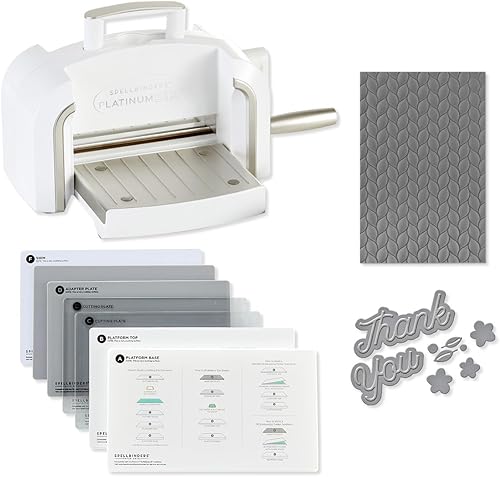
The Spellbinders Platinum 6 is a good choice for cardmakers who own dies from more than one system and want a manual 6-inch platform. It includes the Universal Plate System, a die set and a 3D embossing folder, with compatibility for Spellbinders BetterPress and Glimmer systems.
Its strongest reason to buy is the plate system, particularly if you expect to use a mix of products. Spellbinders says the system works with practically every product on the market, but it is still sensible to check the instructions for each die or folder before making a sandwich.
The starter supply set is smaller in emphasis than the Big Shot kit's 73 dies and assorted cardstock. Choose based on the dies you want to use, not just the machine name.
Buy it if broad die compatibility and Spellbinders system options matter to your setup. Skip it if you need a wide opening or a larger assortment of starter paper supplies.
Sizzix Big Shot Plus Starter Kit: Best for wide card panels
- 9 in opening
- Manual cutting and embossing
- Dies, folder and cardstock included
- Standard platform and thin die adapter included
The 9-inch opening gives more room for wider card elements and larger paper projects. Its starter kit includes a platform, adapter, dies, folder and cardstock.
Pros
- Wide 9 in opening
- Starter materials included
- Works for cardmaking and other paper crafts
Cons
- Larger machine than the 6 in picks
- Manual operation
The Big Shot Plus is the manual pick for cardmakers who often cut wide panels or work on larger paper crafts. Its 9-inch opening creates more room than the 6-inch machines, and the kit includes a platform, thin die adapter, 19 dies, an embossing folder and 40 sheets of cardstock in two selections.
That width can help with broad backgrounds, larger card fronts and gift-box pieces. It also makes the machine a less convenient fit for a tight craft shelf, so measure both the table and storage spot before buying.
Because it is manual, every sandwich still needs to pass through the rollers by hand. The benefit is more width in a familiar plate-and-die process, not an electronic workflow.
Buy it if you make wide panels and want a manual machine with starter materials. Skip it if your cards use small accents only or you lack space for a larger machine.
Sizzix Sidekick Starter Kit: Best for small craft spaces
- 2.5 in opening
- Portable manual machine
- Vacuum seal base
- Starter dies, folders and stamps included
A compact roller for small embellishments and lightweight cardstock. Its vacuum seal can secure it to a smooth work surface.
Pros
- Small and portable
- Starter dies and stamps included
- Secures to smooth surfaces
Cons
- 2.5 in opening restricts design width
- Designed for a single sheet of lightweight cardstock
The Sidekick is for small card details and crafting away from a permanent worktable. Its 2.5-inch opening works with Sizzix Thinlits, Framelits and embossing folders up to that width, and the vacuum seal helps secure it to a smooth work surface.
The starter kit includes dies, small embossing folders and stamps. Sizzix describes the machine as suitable for a single sheet of lightweight cardstock, so plan on small embellishments and repeated accents rather than thick stacks or full card fronts.
This is a useful companion if you already have a larger machine and want a compact option for small shapes. As a sole machine, the narrow opening will limit the kinds of card elements you can make.
Buy it if portability and small decorative cuts are your priority. Skip it as your only machine if you need full-width panels, larger dies or multi-sheet cutting.
Cricut Maker 4 Card Making Kit: Best for varied digital crafts
- Electronic cutting and writing
- Card Mat 2x2 included
- Cuts, scores, foils and engraves with compatible tools
- Bundle includes cardmaking supplies
An electronic option for custom card designs, layered cuts and writing. The bundle includes a Card Mat 2x2 and supplies for cards and other craft projects.
Pros
- Custom digital designs
- Can cut and write
- Bundle includes cardmaking supplies
Cons
- Requires Cricut Design Space
- Some compatible tools are sold separately
The Cricut Maker 4 Card Making Kit is for cardmakers who want digital layouts, custom cuts and a machine that can move into other crafts. The bundle includes a Card Mat 2x2 and supplies for cards, decals, apparel and other projects.
The Maker 4 works with Cricut Design Space and supports cutting, writing, scoring, foiling and engraving with compatible tools. It can cut 300+ materials, and its print-then-cut feature supports full-color printable stickers; some tools are sold separately.
This broad range is useful if cardmaking is one part of your craft routine. It adds a design app and tool-based workflow, so it is less direct than choosing a die and feeding a manual sandwich through rollers.
Buy it if you want custom card layouts and a machine for varied digital craft projects. Skip it if you want a simple physical-die workflow or do not want to use Cricut Design Space.
Cricut Joy Xtra Card Making Bundle: Best for portable card design
- Electronic cutting and writing
- Card mat and insert cards included
- Compact and portable design
- Bundle includes pens and paper supplies
A compact electronic choice for card designs, writing and layered details. The bundle includes a card mat, insert cards, pens and paper craft supplies.
Pros
- Cardmaking supplies included
- Cuts and writes
- Compact design
Cons
- Designs require a computer or mobile device
- Bundle is centered on smaller projects
The Joy Xtra bundle suits cardmakers who want a compact electronic setup with card-focused supplies. It comes with a card mat, insert cards, pens, sticker paper, tools and other paper-craft materials for cutting, writing and layered designs.
Designs are created using a computer or mobile device with Bluetooth and a high-speed internet connection. That makes it a practical fit for people who like to arrange text and shapes digitally, especially for invitations and personalized messages.
Its compact size supports portable crafting, but the bundle centers on smaller projects. If you want a broader mix of materials and craft tasks, the Maker 4 bundle has more room to grow.
Buy it if you want portable digital cardmaking with pens and insert cards included. Skip it if you prefer metal dies, a hand-cranked process or larger mixed-material projects.
Sizzix Big Shot Switch Plus: Best for powered die cutting
- Electric feed and one-touch reverse
- 9 in opening
- 24 Thinlits dies and 3D embossing folder included
- Works with Sizzix Thinlits and Bigz
An electric die cutting and embossing machine with a 9-inch opening and automated feed. Its starter kit includes Thinlits dies and an embossing folder.
Pros
- Electric feed with reverse
- Wide opening
- Starter dies and folder included
Cons
- Not suitable for Bigz Scoreboards
- Requires power
The Big Shot Switch Plus is the powered choice for cardmakers who want a wide die-cutting opening without turning a hand crank. Its automated feeder moves the sandwich through, and the one-touch reverse feature helps bring it back out.
The starter kit includes 24 Thinlits dies and a 3D embossing folder. The 9-inch opening suits wider pieces, and the machine works with Sizzix Thinlits and Bigz dies.
Check your collection before buying because this machine is not suitable for Bigz Scoreboards. It also needs a power source and more working space than a compact manual roller.
Buy it if you want powered feeding for wide manual-die projects. Skip it if you need Bigz Scoreboards, want a portable machine, or prefer a machine that works without power.
Anna Griffin Empress Elite: Best for rotating plate access
- Electric cutting and embossing
- 360-degree turntable
- Large cutting plates
- Works with alternate-brand dies and folders
This electric machine has a turntable for reaching the cutting plates from different angles. Its large plates and compatibility with alternate-brand dies can suit varied card layouts.
Pros
- Large cutting plates
- Turntable access
- Works with other brands' dies and folders
Cons
- Starter dies and folders are not included
- Heavier than compact manual machines
The Anna Griffin Empress Elite suits cardmakers who want electric cutting and embossing with large plates and easy access from different angles. Its 360-degree turntable lets you reach the plates around the machine while working.
Anna Griffin says the Empress Elite works with alternate-brand dies and embossing folders. Built-in handles and a USB charging port add convenience, while the machine itself does not come with a starter die and folder assortment.
The brand describes it as up to 10% faster. That may appeal if you do repeated plate work and value electric operation, but compare the plate size with your projects and budget for dies and folders separately.
Buy it if turntable access and electric plate work fit your routine. Skip it if you want a complete starter kit or a manual machine that needs no power.
VEVOR 9-Inch Die Cutting Machine: Best for foldaway storage
- 9 in opening
- Manual cutting and embossing
- Foldable design
- Starter kit includes dies, folder, plates and cardstock
A manual 9-inch machine with a foldable design and starter supplies. It is an option for buyers who want a wider opening and a kit in one purchase.
Pros
- Wide opening
- Foldable design
- Starter materials included
Cons
- Manual operation
- Confirm included accessories match your preferred dies
The VEVOR 9-Inch Die Cutting Machine is a foldable manual option for cardmakers who want a wide opening and supplies in one kit. It includes six dies, an embossing folder, an embossing pad, a plate, two cutting pads and 10 A5 cardstock sheets.
The 9-inch opening gives room for broader paper pieces, while the foldable design can help when storage space is limited. VEVOR says the machine can work with paper, felt, fabric, leather and thin metals, though cardmakers may use it mostly for paper and cardstock.
Before buying, check that the included plate arrangement suits the dies you plan to use. Manual machines depend on the correct sandwich, and a different die or folder can call for a different combination.
Buy it if you want a foldable 9-inch manual kit with starter supplies. Skip it if you prefer a well-known brand's accessory ecosystem or need electric feeding.
What should you set up before cutting your first card?
Set up a manual machine on a stable surface and identify the correct plate sandwich before feeding any paper through. For an electronic cutter, prepare the design, connect the device and place the card stock on the specified mat.
With a manual roller, begin with the platform and plates that came with the machine. Follow the machine's guide for the die type and folder you are using, then place the die and paper in the stated order; combinations vary, so do not assume one sandwich works for every accessory.
Place cardstock so it lies flat and does not shift as the sandwich enters the rollers. If a cut is incomplete, stop and check the plate order, paper position and die orientation before applying more force.
For an electronic machine, open the design software and select the project or shape. Attach the card stock firmly to the suitable mat, choose the material setting, and check that any pen or tool is installed for the operation in the design.
For step-by-step roller setup, see our Sizzix Big Shot sandwich guide. If you're using a Cricut with card stock, our Cricut cardstock guide covers mat, blade and material-setting choices.
How do you keep card cuts clean and the machine ready?
Keep plates flat, clear away paper scraps and use the recommended sandwich for the die or folder. These habits help prevent shifting and uneven pressure, common causes of incomplete cuts or unwanted marks.
Store cutting pads on a flat surface and rotate them as the machine instructions allow, so the same area does not take every pass. Plates can show cut lines as they are used; check the machine's care guide for replacement guidance instead of trying to force a worn or warped plate through.
Remove small cardstock scraps from dies and folders after each project. A soft brush or gentle tap can clear bits from intricate shapes, while keeping paper dust away from the rollers and work surface helps your next project start clean.
For electronic machines, keep the mat free of loose scraps and return tools to their proper holders. A paper test cut on a small offcut can reveal a poor material setting before you commit a full sheet.
The Sizzix Big Shot plates guide explains the roles of the common pads and adapters. Keep each machine's parts together, since plate combinations are not universal across brands and models.
What mistakes should cardmakers avoid?
The most common mistakes are choosing a machine too narrow for the project, using the wrong sandwich and expecting a manual die machine to behave like a digital cutter. A quick check of size, tool and workflow can save paper and frustration.
Do not buy a compact machine as your only cutter if you regularly make full-width panels. The Sidekick's narrow opening is useful for accents, but a 6-inch or 9-inch machine is a better match for larger pieces.
Do not force a sandwich that feels unusually tight. Stop and check the platform and plate instructions, because an incorrect combination can damage plates or make the handle difficult to turn.
Do not assume that every brand's die, embossing folder or plate system fits every machine. Confirm compatibility, and keep the included adapters available when a die calls for one.
For electronic cutting, avoid skipping the mat or material setting. A loose sheet can shift, while the wrong setting can leave small details attached or cut too deeply into the mat.
Finally, test a new paper or design on a small scrap before making a full set of cards. This is especially helpful when you are changing paper weight, tool or setting.
Which cardmaking machine style fits your projects?
Manual machines fit cardmakers who like physical dies and embossing folders, while electronic cutters suit people who want flexible digital designs and writing. Neither workflow is automatically better; the right one is the one you'll use often.
A manual roller can be ready as soon as the plates, die and cardstock are in place. It is a natural fit for repeated motifs and tactile embossing, with the tradeoff that you turn the handle and work within the machine's opening.
An electronic cutter can resize shapes, arrange layers and write with a compatible pen. It suits custom invitations and coordinated sets, but requires a device and design software.
For a fuller comparison, see manual vs electronic die cutting machines. If you're deciding between a dedicated physical die setup and a digital cutter, can you use metal dies in a Cricut machine explains that these are different tool systems.
What opening size should you choose?
Choose an opening that fits the widest piece you expect to cut, then verify that the compatible plates are wide enough too. Small accents need little room; broad panels and larger paper crafts benefit from a 9-inch opening.
The Sidekick's 2.5-inch opening is designed for narrow dies and folders. A 6-inch platform covers many common card layers, while the 9-inch Big Shot Plus, Switch Plus and VEVOR models leave more space for wide projects.
Measure your planned panel before buying and check the actual plate size, not just the opening. Also consider where the machine will sit during use, since a wider roller needs clear space for feeding a sandwich through.
Which die cutting machine should you choose for card making?
Choose the Sizzix Big Shot Starter Kit if you want one manual machine for common card elements and starter supplies. Choose the Sidekick for small portable accents, a 9-inch roller for wide panels, or a Cricut bundle for custom digital designs and writing.
The best die cutting machine for card making depends on the workflow you want to repeat, not on the longest feature list. If your cards center on physical dies, start with the Big Shot; if you plan to create digital layouts or write directly, choose an electronic option that fits your space and projects.
For more manual options, compare our best manual die cutting machines. If your project plans extend beyond cards, the electronic die cutting machine guide helps match a digital cutter to other paper crafts.
Our top 3 picks at a glance
-
1
-
2
-
3
Frequently asked questions
What type of die cutting machine is best for making cards?
A manual roller is a good fit if you mainly use metal dies and embossing folders. Choose an electronic cutter if you want custom shapes, writing or digital designs.
Opening width matters too: a compact 2.5 in machine suits small embellishments, while 6 in and 9 in machines handle wider pieces.
Can a die cutting machine make a full greeting card?
Yes, if the opening or cutting area fits the card or the layers you want to cut. Many cardmakers cut decorative panels, letters and shapes, then fold and assemble the card by hand.
Check the machine's usable width and the size of its cutting plates before planning a design.
Should I choose a manual or electronic machine for cardmaking?
Choose a manual machine for a direct roller-and-die process, especially if you already own compatible dies. An electronic cutter suits custom designs, cutting from digital files and writing with a compatible pen.
Our manual and electronic machine comparison explains the workflow differences.
What size opening do I need for cardmaking?
A 6 in opening covers many common card layers and embellishments. A 9 in opening gives more room for wide panels, while a 2.5 in opening is best for small shapes and accents.
Measure your largest planned piece and compare it with the machine's opening and plate width.
Can a Cricut cut cardstock for handmade cards?
Yes. Cricut machines can cut cardstock, but the right mat, material setting and blade depend on the machine and paper.
Read our Cricut cardstock guide before cutting a new stock, and follow its recommended settings.


