8 Best Portable Cutting Machines for Small Craft Spaces (October 2026)
The best portable cutting machines for small craft spaces include the Cricut Joy Xtra for mixed small projects, the Cricut Joy 2 Essential for everyday cards and labels, and the Silhouette Portrait 4 for compact vinyl cutting.
On this page (5 sections)
The Cricut Joy Xtra is the best portable cutting machine for most small craft spaces because it handles vinyl, cardstock, stickers and more while also drawing and foiling. Choose the Joy 2 for quick cards and labels, or pick a manual die cutter if your projects use physical dies.
A small craft area rewards machines that match your most common projects. Think about where the cutter will sit, where its tools and materials will go, and whether you want to design on a phone or computer.
For help deciding between machine types, start with our craft cutting machine guide. If your work centers on cards, compare these picks with our best die cutting machines for card making.
Our picks at a glance
-
1

-
2

-
3
How we chose portable cutting machines for small craft spaces
We compared the stated functions, supported materials, size or weight details, included supplies and project fit for each machine. Our score weighs specs and features against what you need from a portable cutter in a limited work area.
The top picks favor a useful balance of compact storage and project range. A machine may be portable yet still be a poor fit if its opening is too narrow for your dies or its format is too small for your usual designs.
Portable cutting machine comparison
The main difference is how each machine cuts: electronic models follow digital designs, while manual machines press dies through material. Use the comparison to narrow the list by the projects and setup you have room for.
| Product | Best for | Project type | Functions | Weight | Our score |
|---|---|---|---|---|---|
| Cricut Joy Xtra | mixed small projects | Vinyl, iron-on, cardstock and stickers | Cut, draw and foil | 250 g | 8.6 |
| Cricut Joy 2 Essential | everyday cards and labels | Just over 2 lb | 8.3 | ||
| Silhouette Portrait 4 | compact vinyl cutting | Cutting and sketching, with electric tool options | 16 oz | 8.0 | |
| Sizzix Sidekick Starter Kit | small die-cut paper projects | 2 lb | 7.9 | ||
| Cricut Joy Xtra Vinyl Starter Kit | starting with vinyl | Vinyl, iron-on, cardstock and stickers | Cut, draw and foil | 7.9 | |
| AccuQuilt GO! Baby | small quilting shapes | 7.0 | |||
| Likcut S501 Vinyl Cutter | connected sticker projects | 2.65 kg | 6.9 | ||
| Spellbinders Platinum 3.5 | compact die cutting and embossing | 5.1 lb | 6.9 |
The best portable cutting machines
The right portable cutter depends on your most frequent projects and how much setup space you can leave out. These picks run from flexible electronic options to small manual machines for paper and fabric.
Cricut Joy Xtra: Best for mixed small projects
- Works with 50+ materials
- Cuts, draws and foils
- Print Then Cut with most inkjet printers
This compact Cricut handles paper and vinyl projects, plus full-color stickers through Print Then Cut with most inkjet printers. The bundle includes a blade, pen, mini weeder and 30 digital images.
Pros
- Works with 50+ materials
- Print Then Cut supports full-color stickers
- Draws and foils as well as cutting
Cons
- Design Space is required
- Some digital content requires a paid subscription
The Cricut Joy Xtra is the strongest all-around choice here for a small space because it combines several common craft jobs in one machine. It works with more than 50 materials, including vinyl, iron-on HTV, cardstock and stickers.
It also cuts, draws and foils, so one machine can support different project types without needing a separate manual die cutter for every task. The Print Then Cut feature works with most inkjet printers for full-color stickers and designs.
The bundle includes a fine-point blade, pen, mini weeder, USB cable, power adapter, practice materials and 30 bonus images. The listed machine weight is 250 g, which makes it easier to move off a shared desk when you need the space.
Design Space connects through computers, tablets and smartphones. Some library content requires a paid Cricut Access subscription, so check whether the free content covers the designs you plan to make.
Choose it if you want one machine for paper, vinyl and sticker work. If you mostly cut small cards or labels, compare it with the narrower Joy 2 below.
Cricut Joy 2 Essential: Best for everyday cards and labels
- 4.5 in cutting width
- Works with 75+ materials
- Bundle supplies for up to 35 projects
The Joy 2 is a small option for cards, decals and labels, with Bluetooth connection to Design Space. Its Essential Bundle includes tools and materials for up to 35 projects.
Pros
- Very light at just over 2 lb
- Works with 75+ materials
- Includes several project materials
Cons
- 4.5 in cutting width limits project size
- Design Space content and features vary by plan
The Cricut Joy 2 suits everyday small projects such as custom cards, simple decals and labels. Its 4.5 in cutting width gives you a clear boundary for sizing projects before you begin.
At just over 2 lb, it is easy to carry to a shelf or store in a cabinet between sessions. It connects to Design Space through Bluetooth and works with more than 75 materials, including vinyl, iron-on, printable materials and cardstock.
The Essential Bundle includes Smart Vinyl, Smart Iron-On, value cardstock, insert card sets and printable vinyl, with supplies for up to 35 projects. It also includes 25 bonus images and one font.
The Joy 2 can write, draw, foil, score and cut, and it works with a home inkjet printer for full-color stickers. Choose it when compact storage and small repeat projects matter more than a wider cutting format.
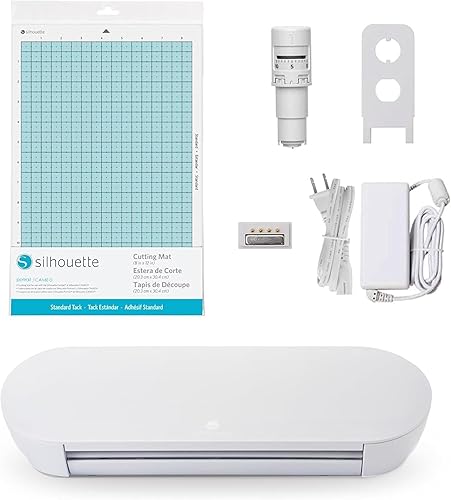
Silhouette Portrait 4: Best for compact vinyl cutting
- 9 in cutting machine
- Electric tool options
- Silhouette New Architecture
The Portrait 4 offers a 9 in cutting format and electric tool options in a light machine. It suits crafters who want more width than a mini cutter while keeping a compact setup.
Pros
- 9 in cutting format
- Electric tool options expand project choices
- 16 oz listed weight
Cons
- Software workflow may take setup
- Included components list only the machine
The Silhouette Portrait 4 gives you a 9 in cutter in a listed 16 oz weight. That wider format than the Joy 2 can suit decals, paper layouts and other designs that need more room across the material.
Silhouette's New Architecture uses a belt-driven chassis, and the machine includes electric tool options alongside cutting and sketching. Its IPT technology is designed to optimize cut order and support layered cuts and sharp angles.
The Portrait 4 is a good fit if you want a compact machine but find a 4.5 in format limiting. Its listed included component is the machine, so plan separately for any tools or materials your first projects need.
Pick it for a light 9 in electronic cutter. If you prefer a manual process with physical dies, the Sidekick is a smaller paper-focused alternative.
Sizzix Sidekick Starter Kit: Best for small die-cut paper projects

- Manual die cutting and embossing
- 2.5 in opening
- Vacuum seal base
The Sidekick is a small manual roller for paper crafts using compatible dies and embossing folders up to 2.5 in wide. Its vacuum seal base helps secure it to a smooth work surface.
Pros
- Portable manual format
- Starter kit includes dies, folders and stamps
- Vacuum seal adds stability on smooth surfaces
Cons
- 2.5 in opening limits die width
- Designed for lightweight paper and cardstock
The Sizzix Sidekick Starter Kit is the best fit here for small paper projects using physical dies. Its 2.5 in opening works with compatible Thinlits and Framelits dies and embossing folders up to 2.5 in wide.
The manual roller weighs 2 lb and measures about 7 3/4 x 4 3/4 x 3 1/2 in. A vacuum seal helps secure it to a smooth work surface while you turn the handle.
The starter kit includes the machine, six Framelits dies, two Thinlits dies, two small embossing folders and seven stamps. Sizzix says it can cut a single sheet of lightweight cardstock to paper, so this is not the pick for large sheets or thick stacks.
Choose it for small cards, tags and layered paper embellishments. For broader manual die and embossing support, the Spellbinders Platinum 3.5 has a wider platform.
Cricut Joy Xtra Vinyl Starter Kit: Best for starting with vinyl

- StandardGrip machine mat
- Smart Vinyl sampler and transfer tape
- Works with 50+ materials
This Joy Xtra bundle adds a mat, vinyl sampler, transfer tape and tool set for projects that involve applying cut vinyl. It also supports Print Then Cut with most inkjet printers.
Pros
- Includes vinyl and transfer supplies
- Works with 50+ materials
- Supports full-color sticker projects
Cons
- The machine is sold in another bundle on this list
- Design Space is required
This Cricut Joy Xtra bundle is a practical entry point if vinyl is the main reason you're buying a cutter. It includes a StandardGrip machine mat, Smart Vinyl sampler pack, transfer tape and a five-piece tool set.
The machine works with more than 50 materials and supports cutting, drawing and foiling. Print Then Cut also works with most inkjet printers, which gives you an option for full-color sticker projects alongside standard vinyl decals.
The included transfer tape measures 9.5 in x 20 ft, and the bundle includes a mat for holding material during cutting. That can reduce the number of separate supplies you need to gather for a first project.
This is the same Joy Xtra machine as the top pick, packaged with vinyl-focused accessories. Pick the main bundle if you want the additional digital images and tools; choose this one if transfer supplies are more useful to your projects.
AccuQuilt GO! Baby: Best for small quilting shapes

- Cuts up to 4 layers of cotton
- Includes two 6 x 6 in dies
- Manual fabric cutter
The GO! Baby is a manual fabric cutter for quilting shapes, with two small dies and a mat in the starter set.
Pros
- Cuts up to 4 layers of cotton
- Starter set includes dies, mat and idea book
- Focused on repeatable fabric shapes
Cons
- Weighs 9.5 lb
- Not compatible with 10 x 10 in or 10 x 24 in GO! dies
The AccuQuilt GO! Baby is the fabric-focused choice for quilters who want repeatable shapes without tracing and cutting each piece by hand.
It cuts up to 4 layers of cotton fabric and comes with two 6 x 6 in dies, a mat and an idea book.
This manual cutter weighs 9.5 lb, so it is portable between rooms but heavier than the small paper and electronic options above. Its starter dies help you begin with the shapes included in the set.
The GO! Baby does not work with 10 x 10 in or 10 x 24 in GO! dies.
Check the die sizes you expect to use before choosing it, especially if you already own a set.
For more fabric options and project types, read our guide to the best fabric cutting machines for quilters. This model makes sense when cotton shapes are your main task and the included die sizes match your patterns.
Likcut S501 Vinyl Cutter: Best for connected sticker projects

- 4.5 in cutting width
- Bluetooth 5.0 and USB 2.0
- Cutting and drawing functions
The S501 supports cutting and drawing, with Bluetooth and USB connection options. Its front cover stores tools and materials, which can help keep a compact work area organized.
Pros
- Two connection options
- Front cover doubles as storage
- Design store includes fonts and designs
Cons
- Design store needs internet access
- The 2.65 kg weight is heavier than the mini cutters
The Likcut S501 combines cutting and drawing with Bluetooth 5.0 and USB 2.0 connections. Its 4.5 in cutting width is aimed at smaller work, and the front cover doubles as storage for tools and materials.
The machine supports more than 50 material types and includes a vinyl bundle. Likcut's Design Store offers more than 1 million designs and 1,200 fonts, with internet access needed for the store.
Voice and text prompts can generate sticker designs through its AI features. Treat that as a convenience for starting an idea, then review the design carefully before cutting material.
At 2.65 kg, it is not the lightest option in this roundup. Choose it if the storage cover and connection choices appeal to you, and compare its software workflow with the Cricut or Silhouette option before settling on a design platform.
Spellbinders Platinum 3.5: Best for compact die cutting and embossing

- 3.5 in platform
- Works with etched and thin metal dies
- Supports 2D and 3D embossing folders
This manual machine handles several die and embossing folder types, plus the Glimmer Hot Foil System. Its 3.5 in platform is wider than the Sidekick's opening.
Pros
- Works with multiple die types
- Supports 2D and 3D embossing folders
- Compact manual format
Cons
- Weighs 5.1 lb
- Small platform limits project width
The Spellbinders Platinum 3.5 is a compact manual machine for crafters who want to use dies and embossing folders. Its 3.5 in platform supports etched dies, thin metal dies, steel rule dies, 2D and 3D embossing folders, and the Glimmer Hot Foil System.
The platform is wider than the Sidekick's 2.5 in opening, which gives you room for more slimline dies and folders. The machine weighs 5.1 lb and has fold-down doors for added stability.
This model suits a small table where you want manual die cutting and embossing in one setup. Its platform is still compact, so measure your largest dies and folders before choosing it.
For a closer look at manual options, see our guide to the best manual die cutting machines. Pick the Platinum 3.5 when its wider die range matters more than an electronic design workflow.
How do you choose a portable cutting machine?
Choose by project size and method first, then compare how the machine connects and what supplies it needs. That keeps a compact purchase from becoming a poor fit for your actual craft routine.
Match the cutting width to your projects
A 4.5 in machine is suited to small cards, labels and decals, while the Portrait 4 has a 9 in format. Manual machines use an opening or platform size, so check that against the dies and folders you plan to use.
For projects that need a larger electronic format, see our guide to the best electronic die cutting machines. A full-size machine may take more room, but it can save time if you regularly work with wider material.
Decide between digital designs and physical dies
Electronic cutters work from digital designs and may connect to an app or design software. Manual machines use physical dies and plates, so they can be simpler for repeated shapes but require compatible dies for each design.
If you're still choosing between these approaches, our manual vs electronic die cutting machine comparison explains the tradeoffs. Consider whether you prefer making new designs on a device or building a collection of dies.
Count the tools and materials around the machine
A cutter needs space for its own body, plus materials, mats, dies, tools and a place to stage finished pieces. A small footprint may still require a larger clear area when you load material or run a project.
Bundles can help you start with supplies in hand, but the included items differ. The Sidekick kit brings dies and embossing folders, while the Joy 2 bundle includes several materials for cards, vinyl and stickers.
Which portable cutting machine should you choose?
Choose the Cricut Joy Xtra if you want one compact electronic cutter for mixed paper, vinyl and sticker work. Pick the Joy 2 for small everyday projects, the Sidekick for physical paper dies, or the GO!
Baby when cotton quilting shapes are the main job.
For a final shortlist by project and machine type, use our cutting machine buying checklist. Measure your storage spot and compare it with the machine's working format before you decide.
Our top 3 picks at a glance
-
1
-
2
-
3
Frequently asked questions
What is the best portable cutting machine for a small craft room?
The Cricut Joy Xtra is a flexible choice for a small craft room because it cuts, draws and foils, and works with more than 50 materials. For smaller cards and labels, the Joy 2 is lighter and has a 4.5 in cutting width.
If you mainly use metal dies, a manual option may fit your project routine better.
Are manual or electronic cutting machines easier to store?
Small manual cutters can be easy to put away because they need no powered connection or digital setup. Electronic cutters add design and material options, but you should also plan space for a device, tools and materials.
Compare the machine's footprint with the full setup you expect to use.
Can a portable cutting machine cut fabric?
Some can, but the machine and cutting method matter. The AccuQuilt GO!
Baby is made for cotton fabric and cuts up to 4 layers, while electronic models have different material and tool limits.
See our guide to cutting fabric and felt with a die cutting machine before choosing.
Do compact cutting machines work for large projects?
Compact machines are best suited to projects that fit their cutting width, platform or die opening. A 4.5 in cutter is a natural fit for small cards and labels, while the Portrait 4 has a 9 in format.
For larger work, compare the project dimensions with the machine's supported size before buying.


