8 Best Vinyl Cutting Machines for Beginners (November 2026)
The best vinyl cutting machines for beginners include the Liene PixCut S1 Color Sticker Printer for print-and-cut stickers, the Likcut S501 Vinyl Cutter Machine for simple vinyl cutting, and the Cricut Joy Xtra Cutting Machine T-Shirt Making for heat-transfer shirts.
On this page (9 sections)
- The best vinyl cutting machines for beginners
- How these vinyl cutting machines compare
- How we compared these machines
- What should a beginner look for first in a vinyl cutting machine?
- Do beginner cutters need a separate printer for stickers?
- How much desk space does a vinyl cutter need?
- Which materials matter most for a first vinyl project?
- Is a kit or a bare machine the better first buy?
- The verdict
The best vinyl cutting machine for beginners is the Cricut Maker 4 Starter Kit, because it bundles vinyl, iron-on and tools for a first project in one box. For plain vinyl at the lowest effort, pick the Likcut S501.
For shirts and totes, the Cricut Joy Xtra bundle has the heat press and iron-on materials already in the box.
A first machine should do one job well rather than everything at once. If you want stickers, a print-and-cut device saves you buying a separate printer.
If you want decals and heat transfer, a dedicated cutter with good software support goes further.
Our home vinyl cutting machine guide covers the wider field if you want more options. For other crafts, see our fabric cutting machine for quilters picks and the manual die cutting machine roundup.
Card makers can also compare die cutting machine for card making options.
Our picks at a glance
-
1
 Best for print-and-cut stickers
Liene PixCut S1 Color Sticker Printer
9.5/10 our score
See it on Amazon -
2

-
3
 Best for heat-transfer shirts
Cricut Joy Xtra Cutting Machine T-Shirt Making
8.7/10 our score
See it on Amazon
The best vinyl cutting machines for beginners
The Cricut Maker 4 Starter Kit is the best overall pick for most new crafters, while each machine below is the best pick for a named need. Start with the job you want to do in your first month.
Cricut Maker 4 Starter Kit: Best starter kit for many materials

- Maker 4 machine with mat and blade
- Vinyl and iron-on sampler sheets
- Tools and project inspiration
- Design Space software
A beginner bundle with the Maker 4, vinyl, iron-on and tools in one box. The machine's 300-plus material range gives new crafters room to grow.
Pros
- Everything needed to start
- Cuts 300+ materials
- Print-then-cut stickers
Cons
- Higher price than simple cutters
- Some specialty tools sold separately
Cricut's kit suits a beginner who wants one box to cover several crafts. It includes the machine, a cutting mat, a blade, tools, vinyl and iron-on sampler sheets, plus project inspiration.
Cricut says the Maker 4 cuts 300+ materials with its 13 compatible tools, covering vinyl, iron-on, paper, fabric, wood veneer and leather. The 144 sq in area and print-then-cut feature handle stickers as well.
Smart Materials allow continuous cuts up to 12 ft without a mat.
Setup runs through Design Space with instructional guides. Cricut says it cuts and writes up to twice as fast as the Maker 3 and Explore Air models.
It also writes, scores, foils, engraves and embosses.
The trade-off is depth versus breadth. It does many jobs well, but specialty tools are sold separately.
Pick it when you want room to try fabric and wood later, not just vinyl.
Likcut S501 Vinyl Cutter Machine: Best for simple vinyl cutting
- Cuts over 46 materials
- Voice and text to design
- 4.5 in cutting width
- Compact A5 body with tool storage
An A5-size cutter that turns voice or text prompts into ready-to-cut designs. It handles vinyl, cardstock and iron-on at a small 4.5 in width.
Pros
- Over 46 materials
- Voice and text design prompts
- Storage slot for weeding tools
Cons
- No print-and-cut feature
- Small 4.5 in cutting width
Likcut suits the beginner who wants to cut vinyl with the least setup. The S501 reads voice commands or text prompts and turns them into ready-to-cut designs, so you skip learning complex software.
Ask for "a cute retro cat eating ice cream" and the design arrives ready to cut.
It cuts over 46 materials, including vinyl, cardstock, iron-on and matless smart material. A 45-degree fine-point blade handles detailed designs on permanent vinyl, and a pen holder lets you draw text and illustrations.
The box adds a vinyl bundle, an adapter and a USB-C cable, so a first project is possible straight away.
The A5 body weighs about 2.6 kg and has a storage slot for weeding tools. Connections cover mobile, tablet and PC.
The active surface area is 310.4 sq cm, and the design store carries a library of ready designs.
The limits are real. Cutting width stops at 4.5 in and the machine can't print and cut.
Likcut states it is for adult use only and shouldn't be operated by children, even with supervision.
Choose it for small decals, labels and party favors rather than full-width shirt designs.
Cricut Joy Xtra Cutting Machine T-Shirt Making: Best for heat-transfer shirts
- Cricut Joy Xtra plus Mini EasyPress
- Smart Iron-On materials included
- Tools and design guides
- Heat transfer workflow
A bundle that pairs the Joy Xtra cutter with a mini heat press and iron-on materials. Beginners get the full design, cut and press workflow for shirts and totes.
Pros
- Heat press included
- Iron-on materials in the box
- Design guides for new crafters
Cons
- Small 92 sq in cutting area
- Focused on apparel rather than flat vinyl
Cricut's bundle suits beginners who want custom shirts, tote bags and hats. It pairs the Joy Xtra cutter with the EasyPress Mini heat press and Smart Iron-On materials, so design, cut and press all happen at home.
Cricut positions the kit for gifts, event shirts, team apparel and small Etsy shops.
Smart Iron-On is easy to weed and apply, which matters most on your first few projects. The mini press reaches curved surfaces and small areas that a full-size press struggles with, like sleeves and baby clothes.
It also works for hard-to-reach spots on tote handles and cap fronts.
The active surface area is 92 sq in, and design guides walk you through the workflow. Cricut backs the bundle with a 1-year warranty against manufacturer defects.
The trade-off is focus. It's built around heat transfer rather than flat vinyl or stickers.
The Joy Xtra also asks you to learn Design Space rather than a prompt-based app.
If you mainly cut decals, a plain cutter costs less and gives you a wider bed.
Siser Romeo High-Definition Cutter: Best for growing vinyl businesses

- 24 in cutting area
- Touch-screen interface
- Matless cutting option
- WiFi with Windows and Mac
A 24 in cutter built for volume work, with Siser heat-transfer vinyl presets and a touch screen. Beginners who plan to sell can grow into it.
Pros
- Large 24 in cutting area
- Presets for Siser HTV
- Quiet, fast motor
Cons
- Big footprint for a home desk
- Overkill for occasional crafters
Siser Romeo suits a beginner who already plans to sell. Its 24 in cutting area doubles the size of the Juliet model, so larger designs and bigger batches fit in one pass.
The open workspace design is aimed at small production runs rather than a hobby shelf.
The touch screen has presets for Siser heat-transfer vinyl and EasyPSV, and the machine also cuts cardstock and stickers. A 12 x 12 in light-tack mat is included, and matless cutting uses the full width.
A built-in registration camera adds print-and-cut precision, and the Leonardo Design Studio software comes with the kit.
Siser says the motor cuts up to 60% faster than traditional desktop cutters and runs quieter. Adjustable pinch rollers, variable grit rollers and commercial blades are features usually found on pro machines.
The active surface area is 285.5 sq in and it works over WiFi with Windows and Mac.
The trade-off is footprint. It measures 36.5 in wide and weighs about 22 lb, which is a lot of desk for occasional crafts.
Choose it when volume is the point, not as a first toy.
Silhouette Cameo 5 Alpha: Best for quiet print-and-cut

- 4-point registration system
- Intelligent Path Technology
- Cuts up to 400 mm/s
- Studio software and AutoBlade included
A quiet 12 x 24 in cutter with a registration system for printed stickers and heat transfers. It cuts, sketches and embosses across many materials.
Pros
- Four-point registration for print-and-cut
- Quiet operation
- Handles materials up to 3mm
Cons
- Software has a steeper learning curve
- Bigger desk footprint
Cameo 5 Alpha suits beginners who want print-and-cut accuracy without noise. The four-point registration system aligns printed images for stickers and heat transfers, with vertical and horizontal corrections.
Intelligent Path Technology reorders cuts for cleaner edges and less material stress.
It handles materials up to 3mm thick across a 12 x 24 in area, cutting, sketching and embossing. The sketch pens adapter and Fast Sketch Mode let it draw designs at higher speeds without losing detail.
Silhouette says the motor runs up to 400 mm/s while staying quiet, which helps in a shared room.
The box includes the AutoBlade, a cutting mat, a sketch pen adapter and 100 designs. It measures 22.28 x 6.94 x 4.89 in and weighs 11.5 lb.
Studio software manages the whole workflow from one program.
The trade-off is software. Studio has more of a learning curve than app-driven machines, and the printer for print-and-cut is sold separately.
Pick it if precise registration matters more than instant setup.
Silhouette Portrait 4: Best for small desks
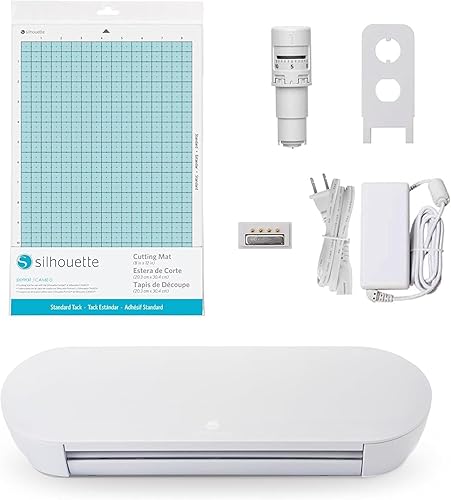
- 9 in cutting width
- IPT cut ordering
- SNA belt-driven chassis
- Electric tool options
A compact 9 in cutter that stays quiet and fits a small desk. The Studio software and IPT cut ordering help beginners get clean results.
Pros
- Small 9 in footprint
- Quiet 50 dB operation
- Electric tool options
Cons
- Narrower than the Cameo
- Fewer materials than larger cutters
Portrait 4 suits a beginner with a small desk. At 9 in wide and 18 x 9 x 9 in overall, it fits where a 12 in or 24 in machine won't, and it runs at about 50 dB so it won't dominate a room.
It weighs just 16 ounces.
The belt-driven SNA chassis and IPT cut ordering help it cut multi-layer shapes and sharp angles without tearing or rounding corners. New electric tool options add functions beyond cutting and sketching.
PixScan and ES mat compatibility round out the workflow.
Silhouette includes Studio software, and the machine comes with a 1-year limited warranty. The active surface area is 81 sq in.
It's the same design environment as the Cameo at a smaller scale.
The trade-off is width. Nine inches limits full shirt-front designs and wide decals.
Choose it for cards, small decals and sticker sheets where space is tight.
Liene PixCut S1 Color Sticker Printer: Best for print-and-cut stickers
- Print and cut in one device
- 300 dpi thermal dye-sublimation prints
- AI image extraction
- Waterproof, scratch-resistant stickers
A sticker maker that prints and cuts in one step, so beginners skip the printer-plus-cutter workflow. The app handles design, AI art and templates.
Pros
- Print and cut in one step
- 300 dpi color prints
- Stickers laminate during printing
Cons
- Cut width limited to 4 x 7 in
- Not built for heat-transfer vinyl
Liene suits a beginner whose first projects are stickers, labels and photo gifts. The PixCut S1 prints and cuts in one device, so you skip the printer-plus-cutter workflow that slows most new crafters.
It measures 11 x 7.7 x 4.1 in and weighs 6.2 lb, so it sits on a shelf between sessions.
Its 300 dpi thermal dye-sublimation prints use 16.7 million colors. The AI image extraction traces subjects for you, and the four-layer process laminates each sticker so it resists water and scratches.
Liene says a sticker takes about 2 minutes, against the 30-plus minutes common with separate machines.
The app offers 50,000+ free images, fonts and elements plus 10,000+ templates with no subscription. Projects run from a phone over Bluetooth.
An AI Lab style feature turns a photo into an anime, fantasy or holiday illustration ready to print as a sticker. The starter media covers 4 x 6 photo paper, 4 x 7 sticker paper and the cutter ink cartridge.
The trade-off is size and scope. Media is capped at 4 x 7 in, and the machine doesn't cut heat-transfer vinyl for shirts.
Liene also warns that each completed sheet should be removed before the next cut, or the stickers can be damaged.
Choose it for sticker and label work rather than apparel or large decals.
Brother ScanNCut SDX125E: Best for scanning hand drawings

- Built-in 600 dpi scanner
- 682 built-in designs
- 5 in LCD touch screen
- Auto blade sensor
The only cutter here with a built-in scanner, so hand drawings and printed stickers become cut files. It works without a computer.
Pros
- Built-in scanner
- 682 built-in designs
- Cuts up to 3mm thick
Cons
- Screen-based editing takes practice
- Large footprint for a desktop machine
Brother's ScanNCut suits a beginner who draws by hand. It's the only machine here with a built-in 600 dpi scanner, so a paper sketch becomes a cut file without redrawing it on a computer.
You can also scan printed stickers and cut around the design directly.
It has 682 built-in designs, including 100 quilting patterns and 9 fonts. The 5 in LCD touch screen handles editing, and the auto blade sensor adjusts to material thickness without you picking a setting.
A half-cut setting cuts only the top layer of vinyl or sticker sheets.
It cuts up to 3mm thick, covering paper, vinyl, fabric, balsa wood and felt. A 12 x 12 in mat, pen, spatula and 76 extra patterns come in the box.
Designs can be saved to internal memory or moved over WiFi or USB.
The trade-off is the screen workflow. Editing on a 5 in display takes practice, and the machine measures 20.9 x 8.4 x 6.8 in.
Choose it for scanned art and standalone use.
How these vinyl cutting machines compare
The table lines up cut width, materials and setup style so you can match a machine to your first project. Print-and-cut models handle stickers in one step, while dedicated cutters do vinyl and heat transfer.
| Product | Best for | Cut width | Print resolution | Connectivity | Our score |
|---|---|---|---|---|---|
| Liene PixCut S1 Color Sticker Printer | print-and-cut stickers | 4 x 7 in media | 300 dpi color | Bluetooth | 9.5 |
| Likcut S501 Vinyl Cutter Machine | simple vinyl cutting | 4.5 in | Mobile, tablet, PC | 8.9 | |
| Cricut Joy Xtra Cutting Machine T-Shirt Making | heat-transfer shirts | 8.7 | |||
| Siser Romeo High-Definition Cutter | growing vinyl businesses | 24 in | WiFi, Windows, Mac | 8.5 | |
| Silhouette Cameo 5 Alpha | quiet print-and-cut | 8.2 | |||
| Silhouette Portrait 4 | small desks | 9 in | USB, Bluetooth | 8.0 | |
| Cricut Maker 4 Starter Kit | starter kit for many materials | 8.0 | |||
| Brother ScanNCut SDX125E | scanning hand drawings | 7.5 |
How we compared these machines
We compared specs and features against what a first-time buyer needs: a short setup, clear software or app support, and a width that fits real projects. Cut width, material range, connectivity and included accessories carried the most weight in each score.
Our score weighs specs, features and buyer feedback against what you're shopping for. A machine with a wider material range scores higher for crafters who want to grow.
A narrow, app-driven device scores higher when easy setup matters more than volume. A kit with a heat press inside gains points for anyone whose first projects are shirts.
We did not test these machines. Every detail here comes from the product data and the makers' published specs.
Prices change often, so check the current cost on each product page before you decide.
What should a beginner look for first in a vinyl cutting machine?
Cut width and software support decide how far a first machine takes you. Most beginners do well with 9 to 12 in of width and an app or program with templates and guided setup.
Cut width
Nine to 12 in covers decals, card fronts and most shirt graphics. The Silhouette Portrait 4 sits at 9 in and the Cameo 5 Alpha at 12 x 24 in.
A 4.5 in machine like the Likcut S501 handles small stickers and labels only. Width also decides your material cost: wider vinyl costs more per roll and leaves more waste on small projects.
Software and app support
Cricut Design Space and Silhouette Studio are the two main design programs, and both have large template libraries. The Liene and Likcut apps lean on prompts and AI tools for faster starts.
The Brother works on its own touch screen. Pick the one whose workflow matches your comfort level.
Materials you plan to cut
Adhesive vinyl and cardstock are the beginner staples. Iron-on vinyl adds shirts and totes, but you also need a heat press.
Check that your shortlist cuts the materials you actually plan to use before you buy.
Do beginner cutters need a separate printer for stickers?
No, unless you want full-color stickers. The Liene PixCut S1 prints and cuts in one device.
Other machines cut sticker sheets you feed in, or use a registration mark to cut around images from a printer you already own.
Print-and-cut in one device
The Liene handles the whole sticker in one step. Media tops out at 4 x 7 in, so it suits small stickers rather than large decals.
The upside is that the lamination happens during printing, so you skip a separate laminating step.
Cut only, with print-then-cut
The Cricut Maker 4 and Cameo 5 Alpha both offer print-then-cut, which reads registration marks around a printed sheet. This needs a separate printer and gives you a much wider range of sizes and finishes.
The Cameo's four-point registration is the more precise of the two on paper.
Cut only, without print marks
The Likcut S501, Portrait 4 and Siser Romeo cut plain vinyl, cardstock and iron-on but can't read print marks. The Brother can scan a printed sheet and cut around the design, so it's the middle path between these two groups.
How much desk space does a vinyl cutter need?
Plan for the machine's body plus room for the mat to feed through. A 12 in cutter needs about 2 ft of width and clear space in front and behind for the mat to travel.
Add storage for rolls and offcuts.
The Siser Romeo is the outlier at 36.5 in wide. The Silhouette Portrait 4 and Likcut S501 fit on a small craft desk.
Measure your workspace, including the mat overhang, before you order. Machines that cut matless, like the Romeo and the Maker 4 with Smart Materials, still need feed room for the material itself.
Which materials matter most for a first vinyl project?
Start with adhesive vinyl for decals and cardstock for cards. Add iron-on only when you have a heat press or iron ready, and skip specialty materials until you've done a few projects.
The Likcut S501 covers over 46 materials, so you can try cardstock, iron-on and vinyl without changing machines. The Cricut Maker 4 goes further with fabric, wood veneer and leather, though some tools are sold separately.
The Brother handles materials up to 3mm thick, including balsa wood and felt. Keep your first material order simple and add as you learn.
Is a kit or a bare machine the better first buy?
A kit usually wins for a true beginner. The Cricut Maker 4 Starter Kit and Joy Xtra bundle both include the materials and tools for a first project, so you can craft the same day.
Bare machines like the Cameo 5 Alpha include an AutoBlade, mat and 100 designs, which covers the basics. The Liene box goes further for stickers, with photo paper, sticker paper and the ink cartridge included.
The Brother adds a mat, pen, spatula and 76 extra patterns.
Compare what's in each box against the project you want to make first. A kit that matches your goal saves more than a lower-priced machine with a long shopping list.
If your first month is all stickers, a kit with a printer inside beats a cutter plus a printer you still have to buy.
The verdict
For most beginners, the Cricut Maker 4 Starter Kit is the best vinyl cutting machine because it bundles vinyl, iron-on and tools for a first project. Pick the Likcut S501 if your goal is plain vinyl at the lowest effort.
Choose the Cricut Joy Xtra bundle for shirts, or the Siser Romeo when you're starting a business.
The Silhouette pair suits crafters who want quiet precision and a wider bed, while the Brother is the pick for hand-drawn art. If you'd rather try cards and paper crafts before committing to vinyl, our card making die cutting machine guide covers the options built for that.
Vinyl cutting rewards a machine that matches your first three projects, not the one with the longest feature list.
Our top 3 picks at a glance
-
1
Best for print-and-cut stickers
Liene PixCut S1 Color Sticker Printer
9.5/10 our score
See it on Amazon -
2
-
3
Best for heat-transfer shirts
Cricut Joy Xtra Cutting Machine T-Shirt Making
8.7/10 our score
See it on Amazon
Frequently asked questions
Do beginner vinyl cutters need a computer?
No. The Likcut S501 runs from a phone or tablet, and the Brother ScanNCut works on its own touch screen.
Cricut and Silhouette machines rely on Design Space and Studio software, which run on a computer, tablet or phone.
How wide should a beginner vinyl cutter be?
A 9 to 12 in width covers most beginner projects, from decals to shirt graphics. The Likcut S501 is narrower at 4.5 in for small stickers and labels.
The Siser Romeo goes up to 24 in for volume work.
Can a beginner cutter handle iron-on vinyl for shirts?
Yes. The Cricut Joy Xtra bundle includes Smart Iron-On and a mini heat press, so the full workflow is covered.
The Likcut S501 and Cricut Maker 4 also cut iron-on vinyl.
You still need a heat press or iron to apply it.
What materials should a first vinyl cutter handle?
Start with adhesive vinyl, cardstock and iron-on. The Likcut S501 cuts over 46 materials.
The Cricut Maker 4 covers 300-plus with its tool range.
The Liene PixCut S1 focuses on photo and sticker paper.


