9 Best Cheapest Vinyl Cutting Machines (November 2026)
The best cheapest vinyl cutting machines by project include the Liene PixCut S1 Color Sticker Printer for print and cut stickers, the Silhouette America Cameo 5 Alpha for wide vinyl projects, and the Cricut Maker 4 for the widest material list.
On this page (8 sections)
- The cheapest vinyl cutting machines, ranked by project fit
- How the cheapest vinyl cutting machines compare
- How these were compared
- What width should a cheap vinyl cutting machine have?
- Does a cheap vinyl cutter include design software?
- Which cheap cutter fits print and cut stickers?
- What should you check before buying a cheap cutter?
- The verdict on cheap vinyl cutting machines
The cheapest vinyl cutting machine for most people is the Silhouette Portrait 4, a 9 inch cutter that ships with Studio software and covers everyday decals without the desk space a 12 inch model takes. For color stickers, the Liene PixCut S1 is the better value because it prints and cuts in one pass.
Cheap doesn't have to mean limited. The lowest tiers here still cut vinyl cleanly; what changes is width, blade handling and whether design software comes included.
Match the machine to your largest project and the extras stop being a false saving.
Our picks at a glance
-
1
 Best for print and cut stickers
Liene PixCut S1 Color Sticker Printer
9.5/10 our score
See it on Amazon -
2

-
3

- 4
 Check it
Likcut S501 Vinyl Cutter Machine
Best for small spaces - 5
 Best cheap vinyl cutting machine for beginnersCheck it
- 6
 Check it
Cricut Joy Xtra Vinyl Starter Kit
Best starter kit for small vinyl jobs - 7
 Check it
Likcut S41 Vinyl Cutter Machine
Best bundled vinyl kit - 8
 Best for no software feesCheck it
- 9
 Best for cutting without a computerCheck it
The cheapest vinyl cutting machines, ranked by project fit
Every pick here lands in a budget or mid tier except the two premium machines, which earn their place on material range and a built-in scanner. Start with your largest design and the software you can live with.
Liene PixCut S1 Color Sticker Printer: Best for print and cut stickers
- Thermal dye-sublimation printer and cutter in one
- 300 dpi prints with 16.7 million colors
- AI image extraction and auto-cutting
- Waterproof, scratch-resistant stickers
One machine prints and cuts color stickers in about 2 minutes. It's the only pick here that makes a finished color sticker without a separate printer.
Pros
- Prints and cuts in one step
- No subscription for the design app
- Laminated, waterproof stickers
Cons
- Capped at 4 x 7 in media
- Bluetooth app control only
The PixCut S1 is the top pick here for anyone whose main project is color stickers. It combines a thermal dye-sublimation printer and a cutter in one unit, so a design goes from app to finished sticker in about 2 minutes.
Its 300 dpi prints use 16.7 million colors, and the four-layer printing process laminates each sticker as it prints. Liene says the results are waterproof and scratch resistant, which matters for water bottles and laptops.
AI image extraction pulls a subject out of a photo and the cutting system follows that edge. The app's AI Lab turns a selfie into an anime character or holiday illustration, which you can then print as a sticker.
Media tops out at 4 x 7 inches, so this is a sticker and label machine rather than a decal plotter.
It measures 11 by 7.7 by 4.1 inches and weighs 6.2 pounds, light enough to move between rooms. The Liene app includes 50,000+ images and templates with no subscription.
That combination of printing, cutting and free design content is why it leads this list.
Silhouette America Cameo 5 Alpha: Best for wide vinyl projects
- 12 x 24 in active surface
- 4-point registration for print and cut
- AutoBlade included
- Cuts materials up to 3 mm thick
The Cameo 5 Alpha gives you a 12 inch feed for banners, large decals and heat transfers. Its registration system aligns printed sheets before cutting.
Pros
- 12 in width for big decals
- AutoBlade means no blade swapping
- Print-and-cut registration
Cons
- Takes more desk space than the Portrait
- Highest tier in this group
The Cameo 5 Alpha is the pick when your vinyl work runs wide. Its active surface measures 12 x 24 inches, enough for banners, large decals and full heat-transfer designs without tiling the artwork.
Silhouette's 4-point registration system aligns printed sheets before cutting, with vertical and horizontal corrections for print-and-cut jobs. An AutoBlade comes in the box, so blade depth adjusts without manual swapping.
A sketch pen adapter and 100 designs are also included.
The motor runs up to 400 mm/s and Silhouette describes it as quiet enough for a shared room. Materials up to 3 mm thick are supported, from vinyl to fabric to cardstock.
Fast Sketch Mode speeds up drawing work without losing detail.
It costs more than the Portrait and needs more desk depth. At 11.5 pounds it stays put once placed.
Choose it when a 9 inch machine would force you to split designs, and the extra width pays for itself.
Cricut Maker 4: Best for the widest material list
- Works with 300+ materials
- Cuts, draws, foils, scores and engraves
- Print-Then-Cut with most inkjet printers
- Bundle includes mats and vinyl sampler
Maker 4 covers vinyl plus leather, wood and cardstock, so one machine can grow with your projects. Cricut says it cuts up to 2X faster than the previous model.
Pros
- Cuts 300+ materials
- Print-Then-Cut for stickers
- Includes a materials sampler
Cons
- Costs more than a vinyl-only cutter
- Some content needs an optional subscription
Maker 4 suits a crafter who wants one machine for vinyl and everything else. Cricut says it works with 300+ materials, including leather, wood and iron-on, and it draws, foils, scores and engraves as well as cuts.
The bundle includes a materials sampler with Smart Vinyl and heat transfer vinyl, plus a light grip mat and a fine-point blade. That means you can cut on day one without a separate supply order.
Print-Then-Cut works with most inkjet printers, so full-color stickers are possible without a combo printer-cutter. Cricut says the machine cuts up to 2X faster than the previous model.
The active surface measures 270.25 square inches.
The trade-off is cost: it sits above the vinyl-only cutters. Some design content sits behind an optional Cricut Access subscription, though the free library still holds 3,000+ images and 100+ fonts.
Likcut S501 Vinyl Cutter Machine: Best for small spaces
- Compact 4.5 in class cutter
- Bluetooth 5.0 and USB 2.0
- Front cover doubles as storage
- Voice and text to design
A small cutter for cards, labels and stickers that sets up in seconds. The AI design tool turns a typed or spoken prompt into a cut file.
Pros
- Fits a small desk
- Storage built into the front cover
- AI design from voice or text
Cons
- Narrow cutting area
- Limited to smaller projects
The Likcut S501 is the space-saving option. Its compact body sets up in seconds on a small desk, and the front cover flips into storage for tools and materials.
It connects over Bluetooth 5.0 or USB 2.0 and Likcut says the link establishes in about 3 seconds. An AI design tool turns a typed or spoken prompt into a ready-to-cut file, so you don't need to learn complex software first.
A design store with 1,000,000+ designs and 1,000+ fonts sits behind the app.
The active surface is 10 x 10 inches and the bundle includes vinyl. Likcut lists cards, labels and stickers as the main projects, which fits the smaller cutting area.
The machine weighs 2.63 kg and takes up little more room than a laptop.
Its trade-off is scale: this machine won't cut a large wall decal in one pass. It suits a renter or student who wants vinyl cutting without giving up a whole table.
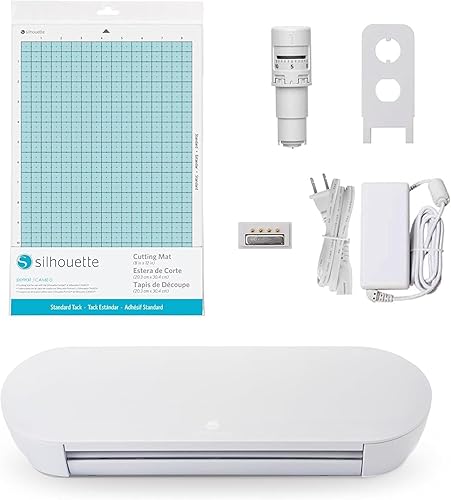
Silhouette Portrait 4: Best cheap vinyl cutting machine for beginners
- 9 inch cutting width
- Studio software included
- IPT cut-order optimization
- Runs at about 50 dB
The Portrait 4 is the lower-cost Silhouette for everyday vinyl decals. It ships with Studio software and cuts up to 9 inches wide.
Pros
- Budget-friendly Silhouette
- Studio software included
- Quiet at about 50 dB
Cons
- 9 in width limits large decals
- Fewer tool options than the Cameo
The Portrait 4 is the value pick among Silhouette machines. It cuts up to 9 inches wide and includes Studio software, so there's no extra cost to start designing after unboxing.
Silhouette's Intelligent Path Technology reorders cuts to reduce material stress. The company redesigned the chassis and belt drive for more precise cuts, and the machine runs at about 50 dB.
Multi-layer cuts and sharp angles are achieved without tearing or rounded corners.
It supports PixScan, which uses a photo of a placed material to align cuts without counting mat blocks. Electric tool options are available beyond cutting and sketching.
For most home crafters, 9 inches covers decals, labels and card layers. The active surface is 81 square inches and the machine weighs just 16 ounces.
The trade-off against the Cameo is width and tool range, not cut quality. If you've been hunting for a truly cheap vinyl cutting machine, this is the one to beat on balance.
See how it fits against the wider field in our guide to the best home vinyl cutting machine.
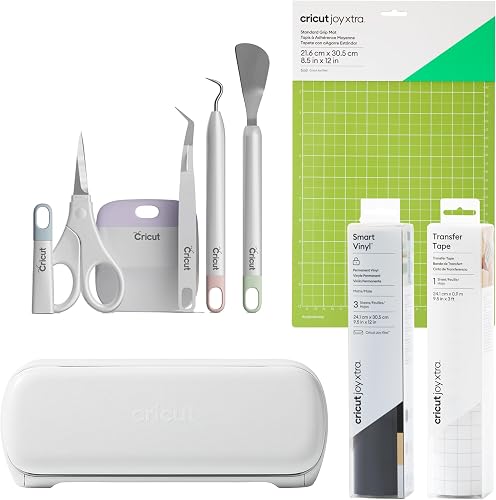
Cricut Joy Xtra Vinyl Starter Kit: Best starter kit for small vinyl jobs
- Works with 50+ materials
- Print-Then-Cut with inkjet printers
- Includes mat, vinyl sampler, transfer tape and tools
- Design Space app
A compact Cricut sold as a kit with the mat, vinyl, transfer tape and tools you need for a first decal. It handles cards, stickers and small vinyl jobs.
Pros
- Everything needed to start
- Print-Then-Cut for stickers
- Small footprint
Cons
- Small cutting area
- Cricut Access is optional and paid
The Joy Xtra kit is aimed at a first project. It arrives with a StandardGrip mat, a Smart Vinyl sampler, a 9.5 in x 20 ft transfer tape roll and a five-piece tool set.
It works with 50+ materials and supports Print-Then-Cut with most inkjet printers for full-color stickers. Design Space connects on desktop and mobile, and the free library holds 3,000+ images and 100+ fonts.
The cutting area is 36 square inches, so this is for cards, small decals and stickers. It writes, draws and foils as well as cuts.
The kit lists seven items in the box, so a beginner can finish a first decal without a separate supply run.
Skip it if you plan to cut large decals or batch out shirt designs. Choose it when you want the Cricut app and a complete starter bundle without the Maker's cost.
The transfer tape alone covers a long run of small projects, so the kit is well stocked for cards and labels.
Likcut S41 Vinyl Cutter Machine: Best bundled vinyl kit
- 36 vinyl sheets and 25 transfer sheets
- 4 cutting mats and weeding kit
- Wired and wireless connection
- On-machine screen with one-touch controls
The S41 arrives with vinyl, transfer tape, mats and a weeding kit, so there's nothing else to buy before your first cut. A small screen shows status on the machine.
Pros
- Large accessory bundle included
- Carrying case for travel
- Screen shows cut status
Cons
- Cutting area suits small jobs
- Fewer design resources than big brands
The Likcut S41 is the most complete bundle here. It includes 36 vinyl sheets, 25 transfer sheets, four cutting mats, a four-piece weeding kit and two pens, plus a carrying case.
The on-machine screen shows real-time progress and status, so you don't need to keep checking the app. One-touch controls handle start, stop, load and unload directly on the unit.
Concise prompts cut down the guesswork on longer jobs.
Likcut rates the cutting accuracy at a 0.2 mm tolerance and the sensor system auto-calibrates the path. It connects over USB-C or Bluetooth 5.0.
The active surface is 42.5 square inches, which suits stickers and small decor.
Pick it when included supplies matter more than a big cutting bed, or when you want to take a cutter to a class or craft night. The case makes it the easiest machine here to travel with.
For fabric work in the same tier, see our roundup of the fabric cutting machine for quilters.
VEVOR Vinyl Cutting Machine: Best for no software fees
- 12 in cutting width
- Design software included at no recurring cost
- Cuts, writes and scores
- USB, Bluetooth and USB drive support
A 12 inch cutter with design software included and no subscription. It imports PNG, JPG, SVG and TIF files and works across desktop and mobile.
Pros
- No recurring software cost
- 12 in width at a low tier
- Works with four operating systems
Cons
- Heavier than the compact cutters
- Software is basic next to Studio or Design Space
VEVOR's 12 inch cutter stands out for software that costs nothing after purchase. The design app is included, so text, graphics and custom projects don't carry a monthly fee.
It works online or offline and updates its content library over time.
It supports PNG, JPG, SVG and TIF imports, which covers most free design files. It cuts, writes and scores, so folded cards and creased projects are within reach.
The machine also lists 20,000+ built-in design resources.
Connection options include USB, Bluetooth and USB drive, and it works with Mac, Windows, Android and iOS. VEVOR lists vinyl, heat transfer paper, cardstock, foil and specialty paper as supported materials.
The trade-off is weight and polish. At 27.3 pounds it isn't portable, and its software is basic next to Studio or Design Space.
It's the pick for a fixed home setup where subscription costs are the deciding factor. The 144 square inch bed gives you 12 inch width at a low tier, but you pay for it in bulk and desk space.
Brother ScanNCut SDX125E: Best for cutting without a computer
- Built-in 600 dpi scanner
- 682 built-in designs and 9 fonts
- 5 in touchscreen
- Auto blade senses material thickness
The only pick here with a built-in scanner, so you can scan a drawing and cut it without a computer. The 5 inch touchscreen runs the whole job.
Pros
- Scanner turns drawings into cut files
- Works without a computer
- Auto blade needs no material selection
Cons
- Highest tier in this group
- Built-in designs are less than an app library
The ScanNCut SDX125E is the only machine here that scans. Its built-in 600 dpi scanner reads a drawing and converts it to a cut file, so you can cut without a computer or design app.
It can also scan printed stickers and fabric and cut the design you want directly.
It ships with 682 built-in designs, including 100 quilting patterns and 9 fonts. The 5 inch touchscreen handles editing and placement, and the auto blade senses material thickness, so there's no blade adjustment or material selection.
Designs save to internal memory or transfer wirelessly.
It cuts up to 3 mm thick, covering paper, vinyl, fabric, balsa wood, chipboard and felt. The 12 x 12 inch mat matches the 144 square inch active surface.
It's the highest tier here, and its built-in design library is smaller than an app's. Choose it when scanning hand drawings matters more than price.
For paper projects specifically, compare it in our roundup of the die cutting machine for card making.
How the cheapest vinyl cutting machines compare
The table lines up width, setup and what each machine includes, which is where the tiers separate fastest. A wider bed and a bundled kit both push the cost up, so weigh which one your projects actually need.
| Product | Best for | Max media size | Cut width | Setup | Our score |
|---|---|---|---|---|---|
| Liene PixCut S1 Color Sticker Printer | print and cut stickers | 4 x 7 in | 4 in stickers | App controlled over Bluetooth | 9.5 |
| Silhouette America Cameo 5 Alpha | wide vinyl projects | 12 in | 9.4 | ||
| Cricut Maker 4 | the widest material list | 12 in class | Cricut Design Space app | 8.7 | |
| Likcut S501 Vinyl Cutter Machine | small spaces | Compact class | App over Bluetooth or USB | 8.6 | |
| Silhouette Portrait 4 | cheap vinyl cutting machine for beginners | 9 in | 8.0 | ||
| Cricut Joy Xtra Vinyl Starter Kit | starter kit for small vinyl jobs | Compact class | Design Space app | 7.9 | |
| Likcut S41 Vinyl Cutter Machine | bundled vinyl kit | USB-C or Bluetooth 5.0 | 7.8 | ||
| VEVOR Vinyl Cutting Machine | no software fees | 12 in | Mac, Windows, Android and iOS | 7.7 | |
| Brother ScanNCut SDX125E | cutting without a computer | 12 in | Standalone with 5 in touchscreen | 7.5 |
Our score weighs specs, features and buyer feedback against what you're shopping for. Width, software cost and included supplies carry the most weight for a cheap vinyl cutter.
A machine with a narrow bed and no bundled vinyl can still win on price, but only for a buyer whose projects already fit.
How these were compared
We started with the specs that decide a cheap purchase: cutting width, supported materials, what comes in the box and whether design software costs extra. The PixCut S1 scored highest because it removes a separate printer from the budget and includes free design content.
The Portrait 4 earns its place as the value pick on a 9 inch bed with Studio included. Machines that need a subscription or a second printer to finish a sticker rank lower for this keyword, even when their cut quality is strong.
The ScanNCut ranks lower on price but stands alone for scanning.
We ranked on the details the makers publish and the buyer feedback in their listings. Where a machine's price tier puts it out of reach for a budget buyer, we say so in the write-up rather than hiding it in a comparison table.
Width and included supplies break most ties, since those are the costs a cheap buyer feels first.
What width should a cheap vinyl cutting machine have?
Width is the first thing to settle, because it caps every project you'll make. A 4 to 10 inch machine covers stickers, labels and cards.
Choose 12 inches when you want banners, large decals or full heat-transfer designs.
When a 9 to 12 inch cutter makes sense
A 9 inch Portrait 4 or a 12 inch VEVOR handles standard decals and shirt designs without tiling. That's the practical minimum for most home crafters.
The Cameo 5 Alpha goes further with a 12 x 24 inch surface for banners. The ScanNCut's 12 x 12 inch mat covers most single-sheet projects without a long feed.
When a compact cutter is enough
The PixCut S1, Likcut S501, S41 and Joy Xtra all cut small. Pick one when your projects are stickers, planner layouts, name tags or phone decals and you don't plan to scale up.
The PixCut S1 is capped at 4 x 7 inches, the S501 and S41 sit at 10 x 10 and 42.5 square inches, and the Joy Xtra offers 36 square inches.
Does a cheap vinyl cutter include design software?
It depends on the brand. The Portrait 4 and Cameo 5 Alpha ship with Silhouette Studio, and the VEVOR includes its design app with no recurring fee.
Cricut machines use the free Design Space app, but some content sits behind an optional Cricut Access subscription.
Which machines charge for design content
Cricut's free library holds 3,000+ images and 100+ fonts. Extra content is optional and paid.
Likcut's design store lists 1,000,000+ designs and 1,000+ fonts. The Liene app includes 50,000+ images and 10,000+ templates with no paywalls.
The ScanNCut carries 682 built-in designs and adds more via USB or wireless transfer.
Which machines work without a computer
The Brother ScanNCut SDX125E runs standalone through its 5 inch touchscreen and scanner. Every other pick here designs through an app, though several connect over Bluetooth to a phone or tablet.
The Liene PixCut S1, Likcut S501 and S41, and both Cricut machines all pair with a phone or tablet, so a laptop is optional for design.
Which cheap cutter fits print and cut stickers?
Two routes get you color stickers. A combo machine like the Liene PixCut S1 prints and cuts in one pass.
A cutter with Print-Then-Cut, like the Cricut Maker 4 or Joy Xtra, works with a separate inkjet printer you already own. The Cameo 5 Alpha takes the same second route with its 4-point registration.
The combo route
The PixCut S1 is the only all-in-one here. It prints 300 dpi color stickers and cuts them in about 2 minutes, with no separate printer and no subscription.
Media is limited to 4 x 7 inches. For planner stickers and gift tags, the speed and the waterproof laminate make it the simplest path to a finished sticker.
The printer plus cutter route
Maker 4 and Joy Xtra both support Print-Then-Cut with most inkjet printers. If you already own a printer, this spreads the cost and gives you a wider cutter.
If you don't, the combo route usually costs less overall. The Cameo 5 Alpha's registration system is the most precise of the three for aligning a printed sheet before the blade follows the edge.
What should you check before buying a cheap cutter?
Check three things: the largest design you plan to cut, whether you already own an inkjet printer and whether the design app costs extra. Those three answers narrow the list faster than comparing blade counts.
Add the cost of vinyl and mats to any machine that doesn't bundle them.
Materials and blade handling
Every pick here cuts vinyl and cardstock. The Cameo 5 Alpha and ScanNCut SDX125E handle materials up to 3 mm thick.
The ScanNCut's auto blade and the Cameo's AutoBlade adjust depth for you. A manual blade means checking depth before each material change.
The Portrait 4 and Cameo add sketching, and the Maker 4 goes furthest with foiling, scoring, engraving and debossing.
Bundles versus buying supplies separately
The Likcut S41, Cricut Maker 4 and Joy Xtra kits arrive with vinyl, mats and tools. The Portrait 4 and Cameo include a blade and software but fewer supplies.
The ScanNCut ships with a 12 x 12 inch mat, pens and a pattern collection. Add the cost of vinyl, transfer tape and a mat when comparing tiers.
Space and portability
The Cameo 5 Alpha is 11.5 pounds and needs a long desk. The Likcut S501 is light enough to store in a drawer, and the S41 includes a carrying case.
The VEVOR weighs 27.3 pounds, so plan a fixed spot for it. Measure your table before choosing a 12 inch machine.
A manual die cutting machine takes even less space if you only need simple shapes.
The verdict on cheap vinyl cutting machines
Pick the Liene PixCut S1 if color stickers are your main project and you don't want a separate printer. Pick the Silhouette Portrait 4 for the lowest-cost route to everyday vinyl decals with real design software included.
For wide banners and heat transfers, the Cameo 5 Alpha justifies its higher tier with a 12 x 24 inch surface and print-and-cut registration. The VEVOR is the no-subscription pick for a fixed home setup, and the Brother ScanNCut SDX125E wins when you need to scan drawings and cut without a computer.
The cheapest vinyl cutting machine that fits your largest project is the one worth buying, not the lowest price on the page.
Our top 3 picks at a glance
-
1
Best for print and cut stickers
Liene PixCut S1 Color Sticker Printer
9.5/10 our score
See it on Amazon -
2
-
3
Frequently asked questions
Do cheap vinyl cutters need a computer?
Most do for design work, though many connect over Bluetooth to a phone or tablet. The Brother ScanNCut SDX125E is the exception, since its built-in scanner and touchscreen let you cut without a computer.
What can a 4 inch vinyl cutter make?
Small stickers, labels, name tags and phone decals. The Liene PixCut S1 prints and cuts color stickers up to 4 x 7 inches, which suits planners and gift tags more than wall decals or shirt designs.
How much vinyl does a starter kit include?
It varies by brand. The Likcut S41 bundle lists 36 vinyl sheets and 25 transfer sheets with four mats and a weeding kit.
The Cricut Joy Xtra kit includes a vinyl sampler, one mat, transfer tape and five tools.
Can a cheap cutter handle heat transfer vinyl?
Yes if it lists HTV as a supported material. The Cricut Maker 4 bundle includes Smart Iron-On and Matless Heat Transfer Vinyl, and the VEVOR lists heat transfer paper.
Check the material list before buying.
Why do some vinyl cutters cost more than others?
Width, blade systems, built-in scanners and design software separate the tiers. A 12 inch cutter with an auto blade costs more than a compact 4 inch model.
Decide on width and software first, then compare within that tier.


