Siser Cutting Machine vs Cricut: Which to Buy? (November 2026)
Pick Cricut if you want a big library of designs and cheap replacement mats, and pick a Siser cutter if you cut a lot of Siser heat-transfer vinyl and want its own blade system. This Siser cutting machine vs Cricut comparison is really about what you cut, not which brand sounds stronger.
On this page (9 sections)
- Siser cutting machine vs Cricut: the quick verdict
- The two machines side by side
- Cutting vinyl: which machine handles Siser EasyWeed better?
- Mats and blades: which ecosystem is cheaper to run?
- Print and cut: can either one make stickers?
- Software and design help: which is easier to learn?
- Who should buy which?
- Mats, blades and metal dies: what fits what?
- Siser cutting machine vs Cricut: the verdict
Pick Cricut if you want the widest design library and cheap replacement mats, and pick a Siser cutter if your projects run on Siser heat-transfer vinyl. The Siser cutting machine vs Cricut question comes down to whether you want a hobby platform or a vinyl-first blade cutter.
Both are electronic cutters that drag a blade through vinyl, cardstock and iron-on. Neither prints, so printed stickers need a separate machine.
The differences show up in the mats, the software and the kind of vinyl each brand is built around.

 Best for heat-transfer projects
Siser EasyWeed Heat Transfer Vinyl 11.8" x
Siser cutting machine vs Cricut: the quick verdict
Cricut wins for most first-time buyers, and Siser wins when EasyWeed is the whole point. Cricut's edge is a large design library and mats you can buy in packs.
Siser's edge is a cutter tuned to Siser HTV, including the Romeo and Juliet high-definition machines.
Cricut sells several sizes, from the compact Joy up to the Maker. Its app holds the design library and sends cuts over Wi-Fi or Bluetooth.
The mats are sold in multi-packs like the HTVRONT 12 x 12 set, which keeps a busy cutter running without a single-mat purchase every week. That set bundles three standard-tack mats with one light, one strong and one fabric mat, so paper, vinyl, chipboard and cloth each get the right grip from one box.
A Siser cutter takes a different angle. It's a blade plotter built around the Siser vinyl line.
EasyWeed is 11.8 in wide, a craft size that fits almost any hobby or pro cutter, and its sticky carrier backing makes small letters easier to weed. If your shop or craft table runs on HTV shirts and bags, that's the workflow to match.
For a broader view of the field, our guide to which cutting machine is best walks through the other brands and what each one is built to cut.
The two machines side by side
The table below lines up the practical differences: what each brand cuts, how it connects, and which mats and vinyl fit. Read it as a starting point, then match each row to your own projects.
| Feature | Cricut | Siser cutting machine |
|---|---|---|
| Cutting method | Blade drag | Blade drag |
| Cutting width | Varies by model, from compact to wide | Varies by model, including the 9 in Portrait-style size |
| Software | Cricut Design Space app | Siser's own software for its cutters |
| Design library | Large, with a paid subscription tier for extra images | Built around Siser vinyl and cut settings |
| Mats | Cricut-style mats, sold in packs | Siser-style mats |
| Best-known output | Vinyl, iron-on, cardstock, some models print-and-cut | Heat-transfer vinyl, especially EasyWeed |
| Prints on its own | Only the print-and-cut models | No |
The row that decides most purchases is the last one. A Cricut Maker or Explore cuts shapes; a Cricut print-and-cut model handles printed stickers.
A Siser cutter is a blade machine only.
The mats row carries more weight than it looks. Cricut mats come in a stack of tack levels and sizes, so you can match the grip to the material instead of forcing one mat to do everything.
Siser's supply is narrower, which is fine if you cut mostly HTV but thin if you jump between paper, fabric and heavy cardstock.
Cutting vinyl: which machine handles Siser EasyWeed better?
Both cut EasyWeed cleanly, but a Siser cutter is set up for it out of the box. EasyWeed is 11.8 in wide and 90 microns thin, and Siser says it works on virtually any craft or professional cutter, Cricut included.
That means you don't lose anything by cutting EasyWeed on a Cricut. You pick the iron-on setting, place the vinyl shiny side down on a standard mat, and weed as usual.
The sticky carrier backing holds small details, and the vinyl peels hot or cold, so you don't wait for a cooldown.
What a Siser cutter adds is a tighter fit between the vinyl and the cut settings. If you cut HTV every week for shirts, bags or team jerseys, that matters more than a design library you rarely open.
Siser's own high-definition cutters, the Romeo and Juliet, are sold for exactly this work.
EasyWeed's 90 micron thickness is the detail that changes how a design feels on the shirt. A thinner film sits flatter on cotton, polyester, blends and even leather, so layered names and numbers don't build up into a stiff patch.
The 1-second tack for layering means you can stack colors without a long press between each layer. EasyWeed is also CPSIA certified, which matters for anyone cutting kids' clothing and school shirts.
None of that depends on the cutter brand. It depends on using EasyWeed and getting the cut and press settings right.
Mats and blades: which ecosystem is cheaper to run?
Cricut mats are easy to buy in multi-packs and easy to replace; Siser mats come from a smaller pool of sellers. Running costs come down to how often you replace a mat, not the machine's sticker price.
Cricut mats come in light, standard, strong and fabric tack. The HTVRONT 12 x 12 set bundles all four levels in one six-pack, so paper, vinyl and fabric jobs each get the right grip.
The included scraper and spatula help you lift cut shapes without tearing the mat surface.
Cricut's mat sizes run from the small Joy mats up to 12 x 24. Our guide to Cricut mat sizes helps you match a mat to the machine before you buy a pack.
Siser mats are made for Siser cutters, so a Cricut mat won't fit a Siser machine and the reverse is also true. The same goes for blades.
If you already own a stack of Cricut mats, switching brands means replacing them.
How to keep mats alive longer
The HTVRONT mats use a PVC surface with a protective film, and the care routine is the same for either brand. Keep the clear film on between jobs so dust and lint don't settle on the adhesive.
Wipe the mat with a damp lint-free cloth and let it air dry flat, since towel drying leaves lint behind. Use the scraper to lift leftover vinyl and the spatula to ease cut shapes off without bending them.
The tack level matters as much as the cleaning. Paper and vellum sit best on a light-tack mat, while vinyl, cardstock and iron-on need standard tack.
Chipboard, leather and magnets want strong tack, and fabric needs its own fabric mat rather than a standard one. Matching the material to the tack keeps a mat sticky longer and stops thin paper from tearing on the way up.
HTVRONT color-codes the four levels, blue for light, green for standard, purple for strong and pink for fabric, so you can grab the right one without reading the label.
Print and cut: can either one make stickers?
Neither a Cricut blade machine nor a Siser cutter prints on its own. A Cricut print-and-cut model can print and then cut a sheet, but the Siser line is blade cutting only.
For stickers as the main job, a print-and-cut sticker maker is the simpler buy.
The Liene PixCut S1 prints and cuts in one device. Liene says it finishes a sticker sheet in about 2 minutes, where a separate printer and cutter takes far longer.
It prints at 300 dpi with 16.7 million colors, and its AI image extraction finds the subject in a photo so the blade follows the edge.
The four-layer thermal dye-sublimation paper is laminated during printing. Liene says the stickers come out waterproof and scratch-resistant.
The app includes 50,000+ free images and 10,000+ templates with no subscription.
If your plan is printed stickers, the PixCut S1 replaces a cutter rather than sitting beside one. A Cricut or Siser machine still wins for cut-only vinyl, iron-on and cardstock work.
The PixCut S1 also takes Bluetooth from a phone, tablet or laptop, so a sticker job doesn't tie up a computer the way a cutter often does.
One practical note from Liene's own guidance: when printing several sheets in a row, remove each finished sheet before starting the next. Leaving a sheet in place can damage the stickers and throw off the cut.
That's a small habit, but it keeps results consistent on a machine that prints and cuts in one pass.
Software and design help: which is easier to learn?
Cricut's Design Space is the friendlier start for a beginner, and Siser's software assumes you already know your way around cut settings. The learning curve follows the brand's audience.
Cricut Design Space runs on desktop and mobile. It holds a large library of images and templates, and a subscription opens more.
A beginner can open the app, pick a design, size it and send it to the machine without drawing a thing. The app also handles the connection, so a laptop, phone or tablet can drive the cutter.
Siser's software is built for people cutting HTV. The focus is on clean cut settings for Siser materials rather than a giant image library.
A crafter who already knows EasyWeed's heat settings will feel at home; a first-timer may find the design side thin.
The press step matters as much as the cut. Siser lists 305°F at medium pressure for 15 seconds on a heat press, or a home iron set to cotton or high.
EasyWeed can be peeled hot or cold, so you don't have to wait for the shirt to cool before pulling the carrier. Plan that tool into the budget whichever cutter you buy.
A cutter only gets you a weeded design; the press is what makes it stick.
Who should buy which?
Buy a Cricut for a broad hobby workflow and a Siser cutter for a vinyl-heavy shop. The right pick follows the projects you already have planned.
Buy a Cricut if:
- You want a large design library and a friendly app for your first machine.
- Most of your cuts are vinyl, iron-on or cardstock and you want cheap replacement mats in multi-packs.
- You may want print-and-cut stickers later from one brand.
- You'd rather buy mats and blades in widely stocked packs.
Buy a Siser cutter if:
- Heat-transfer vinyl is most of what you cut, and you already buy Siser EasyWeed by the roll.
- You want a blade cutter tuned to Siser materials and its own cut settings.
- You plan to step up to a Siser high-definition cutter like the Romeo or Juliet.
- You don't need a design subscription or a print-and-cut feature.
Look at a print-and-cut sticker maker if:
- Printed stickers, labels or photo gifts are the main project.
- You want printing and cutting in one step instead of two machines.
- You'd rather skip mats and blades and work from an app.
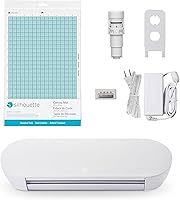
A 9 in cutter like the Silhouette Portrait 4 fits a narrow desk and uses its own Studio software and PixScan for printed designs. It's a third option if you have very little table space and already like Silhouette's workflow.
Its 9 in cutting width and 81 square inch active area suit small decals, card fronts and journal pages rather than big wall signs. The Portrait 4 runs at 50 db, and its belt-driven chassis with IPT technology is built to cut multi-layered shapes and sharp angles without tearing or rounding corners.
For a direct comparison of that brand, see Silhouette cutting machine vs Cricut.
Mats, blades and metal dies: what fits what?
Cricut machines take Cricut-style mats and blades, and Siser machines take Siser's. Neither brand accepts the other's accessories, so your existing mat stack counts in the decision.
That's why a Cricut owner with a shelf of mats should think twice before switching. A Siser owner with a supply of Siser mats faces the same problem in reverse.
Budget for new mats and blades if you change brands. It's worth adding up what's already on the shelf before you commit, since a stack of 12 x 12 mats is a real cost to replace.
Metal dies are a separate world. Both Cricut and Siser are electronic blade cutters, so metal dies don't fit either one.
Our post on whether you can use dies in a Cricut explains why a die-cutting press is the tool for that job.
Siser cutting machine vs Cricut: the verdict
For most readers, buy a Cricut. It's the easier first cutter, the design library is bigger, and mats are cheap to restock in packs like the HTVRONT six-pack.
That combination covers vinyl, iron-on and cardstock without much setup work.
Buy a Siser cutter instead if Siser vinyl is your main material and you want a blade machine built around it. Skip both if printed stickers are the whole plan; the Liene PixCut S1 prints and cuts in one step and saves you a second machine.
The Siser cutting machine vs Cricut choice is really a question about your craft table. If it's full of EasyWeed rolls, go Siser.
If you want the widest range of projects and the easiest start, go Cricut.
Frequently asked questions
Is Siser a cutting machine or a vinyl brand?
Siser is best known for heat-transfer vinyl, and it also sells the Romeo and Juliet blade cutters. A Siser cutter cuts vinyl the way a Cricut does, but it does not print.
For printed stickers you need a print-and-cut machine like the Liene PixCut S1.
Can a Cricut cut Siser EasyWeed?
Yes. Siser EasyWeed measures 11.8 in wide and works on virtually any craft or professional cutter, Cricut included.
Set your Cricut to the vinyl or iron-on material setting, place the HTV shiny side down on a standard mat, and weed as usual.
Does a Cricut need its own mats and blades?
Yes. Cricut machines use Cricut-style mats and blades, so a Siser cutter's mats won't fit.
A six-pack like the HTVRONT 12 x 12 mats covers light, standard, strong and fabric tack jobs and works with Cricut Maker, Explore and Air machines.
Which is better for printed stickers, Cricut or Siser?
Neither one prints on its own. A Cricut or Siser cutter cuts shapes from vinyl or cardstock, while the Liene PixCut S1 prints and cuts stickers in one step.
If stickers are the whole plan, the PixCut S1 replaces the cutter rather than adding to it.
Can I use metal dies in a Cricut or a Siser cutter?
No. Both are electronic blade cutters, so metal dies don't fit them.
Metal dies need a die-cutting press instead.
Which machine is easier for a beginner?
A Cricut is the easier first machine because the app and design library do most of the setup for you. A Siser cutter suits someone already comfortable with Siser vinyl and cut settings, since its workflow is built around the vinyl rather than around a big design library.