Silhouette vs Cricut: Which Cutting Machine to Buy? (November 2026)
Pick the Silhouette Portrait 4 if you want fine control over blade depth and cut order on small, detailed work, and pick Cricut if you want the friendliest software and the widest accessory shelf. The Silhouette cutting machine vs Cricut choice really comes down to whether you value tinkering or hand-holding.
On this page (9 sections)
- Silhouette vs Cricut at a glance
- Which software is easier to learn?
- How do the blade and cutting systems compare?
- Which mat system should you plan around?
- Which handles the materials you actually cut?
- How much space and quiet do you need?
- Who should buy the Silhouette Portrait 4?
- Who should buy a Cricut?
- Which machine wins for your projects?
Pick the Silhouette Portrait 4 if you want fine control over blade depth and cut order on small, detailed work, and pick Cricut if you want the friendliest software and the widest accessory shelf. That's the short version of the Silhouette cutting machine vs Cricut decision: Silhouette rewards patience with precision, while Cricut rewards you with speed and hand-holding.
Both machines cut vinyl, cardstock and heat transfer material. The gap opens up in software, blade systems and how much fiddling you enjoy.
This comparison uses the Silhouette Portrait 4 as the Silhouette example and the Cricut Maker and Explore lines for Cricut, since those are the machines most buyers weigh.
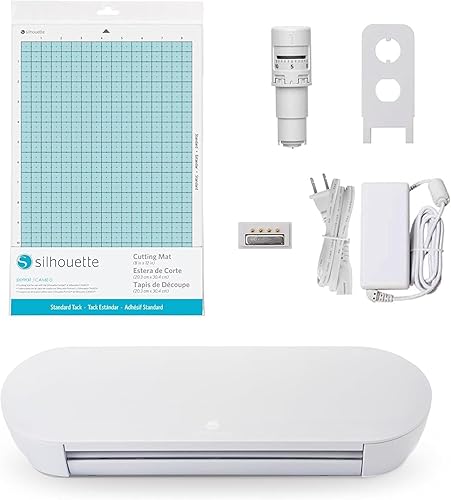
 Best for small Portrait projects
Silhouette Cutting Mat for Portrait Machines
Silhouette vs Cricut at a glance
The Silhouette Portrait 4 is the smaller, quieter, more precise cutter, while Cricut's strength is its software and its huge accessory range. Neither wins on every line, so read the table by what you'll actually cut.
| Feature | Silhouette Portrait 4 | Cricut Maker and Explore |
|---|---|---|
| Cutting width | 9 in | 12 in |
| Software | Silhouette Studio | Cricut Design Space |
| Cut order | IPT optimization built in | Design Space handles ordering |
| Noise | 50 dB | Not stated for these models |
| Blade system | Belt-driven SNA chassis | Dual-carriage tool system |
| Mat size | 8 x 12 in | 12 x 12 in |
| Foil accents | Not included | Foil Transfer Kit available |
The Portrait 4's 9 inch width handles letter and A4 sheets and most vinyl decals without trimming down, but wide 12 inch layouts need a bigger Silhouette model. Cricut's 12 inch platform suits full-sheet vinyl and larger card projects, and that extra width opens the door to the Cricut Foil Transfer Kit.
The Portrait 4 lists an 81 square inch active cutting area and weighs just 16 ounces. The HTVRONT mats, by contrast, are square 12 x 12 sheets built for the wider Cricut carriage, so the two systems don't share a footprint at all.
Which software is easier to learn?
Cricut Design Space is the easier start for most people, while Silhouette Studio gives you more control once you're past the basics. The difference shows up in your first week, not your first hour.
Design Space walks you through each step and keeps most settings behind simple prompts. You pick a material, load the mat and press go.
That hand-holding is why Cricut dominates beginner craft rooms. Silhouette Studio asks more of you up front.
You set blade depth, speed and cut order, and you'll learn what "too much pressure" means the hard way once or twice. The payoff is control over tricky materials and layered designs.
Both are free to design and cut with. Paid tiers add images and fonts, but neither machine needs a subscription to work.
If you've used vector software before, Studio will feel familiar fast. If not, Design Space is the gentler runway.
A quick note on loading and feeding
Cricut's load process is guided on-screen, which helps when you're new to mat placement. Our walkthrough on how to load a Cricut machine covers the steps so your first cut doesn't skew.
Silhouette's feeding is similar in spirit but relies more on your own alignment against the mat grid. That's where a good mat earns its keep.
How do the blade and cutting systems compare?
Silhouette's IPT technology optimizes cut order to keep tension even, while Cricut's tool system swaps blades and pens in one carriage. Both produce clean cuts, but they get there differently.
The Portrait 4 runs on a belt-driven chassis Silhouette calls SNA, short for Silhouette New Architecture. IPT then reorders cuts so multi-layer work and sharp angles come out without tearing or rounded corners.
That matters on intricate decals and small lettering. Cricut's Maker and Explore machines use interchangeable tools in a dual carriage.
You swap in a fine-point blade for vinyl, a deep-cut blade for heavier stock, or a pen for sketching. The Foil Transfer Kit plugs into the same system with fine, medium and bold tips.
The practical split: Silhouette asks you to trust the machine's ordering and set the blade depth correctly. Cricut asks you to own the right tool for each material.
One is a settings puzzle, the other is an accessory collection. Silhouette also markets new electric tool options for the Portrait 4, which widen what the machine can do beyond plain cutting and sketching.
That's a smaller shelf than Cricut's, but the Portrait 4 is not locked to a single blade either.
Where the foil kit fits
The Cricut Foil Transfer Kit adds gold and silver shine to cards and invites using pressure instead of heat. It ships with 12 foil sheets and a 3-in-1 tool.
It's a Cricut-only add-on, so if foil accents are central to your plans, that tilts the choice toward Cricut.
The kit's three tips run fine, medium and bold, so you can move from hairline lettering to thick decorative borders without changing machines. Because the transfer is pressure-activated, you skip the heat-press step that foil usually demands.
Just know each sheet is a one-shot transfer, so plan your layout before you commit.
Which mat system should you plan around?
Silhouette mats are sized to the Portrait's 9 inch width, while Cricut mats are 12 x 12 and easier to find from third parties. Mat cost adds up over a year, so factor it in early.
The Silhouette Cutting Mat for Portrait Machines is 8 x 12 inches with a 1 inch grid. That grid does real work: it helps you line up 8.5 x 11 or A4 paper square so your cuts land where you planned.
The standard-grip surface holds vinyl and cardstock without slipping.
Cricut's mat world is wider. The HTVRONT 12 x 12 set gives you six mats across light, standard, strong and fabric tack, each color-coded so you grab the right one.
A free scraper comes in the box. For anyone cutting a mix of paper, vinyl and fabric, that range is hard to beat on value.
Matching tack to material
The HTVRONT set's color coding is a cheat sheet in itself. Blue marks light tack for paper and vellum, green marks standard tack for vinyl, cardstock and iron-on, purple marks strong tack for chipboard, leather and magnets, and pink marks the fabric mat.
The set includes three standard mats, one light, one strong and one fabric, which covers most home craft projects without a separate purchase.
The Silhouette mat keeps it simpler: one standard-grip rubber surface for everything from paper to vinyl. That's less to think about, but it also means no dedicated fabric or strong-tack option in this size.
Both mats are hand wash only. The HTVRONT set adds storage guidance that matters for longevity: keep the clear protective film on between uses, and use the free scraper to clear scraps before they harden onto the surface.
Those habits stretch mat life on either brand.
Which handles the materials you actually cut?
Cricut covers more material types out of the box because its tool line is broader, while Silhouette's precision suits fine vinyl and paper detail. Think about your last three projects, not a hypothetical craft room.
For vinyl, both machines do well. Cricut's standard-grip mat plus fine-point blade is a proven combo for heat transfer vinyl and permanent vinyl.
Silhouette's Portrait 4 handles vinyl cleanly too, and the mat's grid helps when you're cutting multiple small decals from one sheet. For cardstock and layered paper, Cricut's Design Space material presets remove a lot of guesswork.
Silhouette asks you to set pressure yourself, but IPT keeps layered cuts from tearing at the corners.
For fabric, Cricut's Maker line has a dedicated rotary blade and fabric mat. Silhouette can cut fabric with the right blade and backing, but you'll tune settings in Studio.
If quilting or appliqué is a big part of your plans, Cricut is the smoother path. The Portrait 4 does list fabric among its print media, so the capability is there.
It's the settings work that separates the two.
What about heat transfer and shirts?
Both brands cut heat transfer vinyl for shirts, and both have large communities sharing settings. If shirts are your main project, our roundup of the best Cricut and Silhouette machines for T-shirts compares the models built for that work.
The foil kit is the clearest example of Cricut's accessory advantage. It's a niche add-on, but it shows how the brand builds tools around its machines.
Silhouette's strength is that the Portrait 4's core cutting is precise enough that you need fewer add-ons to get clean results.
How much space and quiet do you need?
The Portrait 4 is compact and runs at about 50 dB, so it fits a desk or a shared room better than a wide-format machine. If your craft space is a corner of the living room, that matters.
At 9 inches wide, the Portrait 4 takes less bench space than a 12 inch Cricut. Its belt-driven chassis and 50 dB rating mean you can run it while someone else watches TV or takes a call.
Cricut's Maker and Explore machines are bigger and need a 12 inch mat to feed. That's fine on a dedicated craft table but tight on a kitchen counter.
Noise and footprint aren't the headline features in most comparisons. They become decisive when your workspace is shared or small.
The mat dimensions tell the storage story too. The Silhouette 8 x 12 mat slips into a drawer or a folder.
A 12 x 12 HTVRONT mat needs a wider flat spot, and the set of six needs room to stack without bending the edges. Bending a mat is the quickest way to spoil its grip.
Who should buy the Silhouette Portrait 4?
Buy the Portrait 4 if you cut small, detailed designs and want control over how each layer is cut. It rewards crafters who don't mind learning their tools.
The Portrait 4 suits card makers, decal cutters and anyone working mostly in letter and A4 sizes. IPT cut-order optimization and the SNA chassis are built for sharp angles and multi-layer work without tearing.
Its 50 dB operation helps in shared rooms. The 81 square inch cutting area covers an 8.5 x 11 sheet with room to spare for registration marks, so the Portrait 4 matches a print-then-cut workflow without trimming.
It also carries a 1 year limited warranty from Silhouette America.
Skip it if you routinely cut 12 inch layouts or want a big library of brand-made add-ons. The narrower width is the real limit, not the software.
Who should buy a Cricut?
Buy a Cricut if you want easy software, wide mats and a large accessory ecosystem, and you're willing to buy tools as your projects grow. It's the lower-friction choice for most new crafters.
Cricut suits beginners, teachers and anyone who wants to start cutting the same day. Design Space guides the process, and 12 x 12 mats fit full sheets of vinyl and cardstock.
The Foil Transfer Kit and the wider tool line give you room to expand. The HTVRONT mats cover the machine list well: Cricut Explore 5, 4 and 3, Maker 4, Maker 3, Maker, Air 2 and One.
The mats are made of non-toxic PVC and are easy to clean, which helps when you switch from vinyl to paper.
Skip Cricut if you want a compact, quiet machine and prefer to dial in settings yourself. The accessory route also costs more over time as you add tools.
Which machine wins for your projects?
For most first-time buyers, Cricut wins on software and accessories; for detail-focused crafters, the Silhouette Portrait 4 wins on precision and quiet. Weigh your own project list against those two strengths.
Choose the Portrait 4 if your work is small, layered and detailed, and you'd rather set blade depth than buy another tool. Choose Cricut if you want the gentlest learning curve and the widest shelf of add-ons.
The Silhouette cutting machine vs Cricut question doesn't have one answer for every crafter. It has a clear answer for your next ten projects.
Write them down, check the widths and materials against the table above, and buy the machine that matches the list. If the list includes a lot of 12 inch vinyl and foil accents, the Cricut path is the straighter one.
If it's mostly cards and small decals, the Portrait 4's precision is the better fit.
If you're still narrowing the field, our buying checklist for choosing a cutting machine turns those project notes into a shortlist. For a step up in size within either brand, the Silhouette Cameo 5 vs Cricut Maker 4 comparison covers the wider models.
Frequently asked questions
Is Silhouette or Cricut better for beginners?
Cricut is the easier start for most beginners because its software walks you through each project step. Silhouette Studio gives you more control, but you'll spend more time learning blade depth and cut settings before your first clean cut.
Can Silhouette use Cricut mats?
No, the two brands use different mat sizes and machine widths. A Portrait needs an 8 x 12 inch Silhouette mat, while Cricut Maker and Explore machines take 12 x 12 inch mats like the HTVRONT set.
Mixing them means the mat won't feed correctly.
Which machine cuts fabric better?
Cricut sells a dedicated rotary blade and fabric mat for its Maker line, so fabric work is more plug-and-play there. Silhouette can cut fabric with the right blade and stabilizer, but you'll dial in settings yourself in Studio.
Do I need a subscription to use either machine?
No. Both Silhouette Studio and Cricut Design Space let you design and cut for free.
Paid tiers add extra images and fonts, but neither machine refuses to cut without one.
Which brand has cheaper replacement mats?
Third-party mats are the budget route for Cricut, with six HTVRONT mats covering four tack levels. Silhouette mats cost more per mat because fewer third-party makers produce the 8 x 12 Portrait size.


