9 Best Cricut Alternatives for Cards, Vinyl and Fabric (October 2026)
The best alternatives to Cricut cutting machines include the Silhouette Cameo 5 Alpha for mixed media, the Silhouette Portrait 4 for narrow workspaces, and the Spellbinders Platinum 6 for detailed cards.
On this page (4 sections)
The best Cricut alternative for mixed projects is the Silhouette Cameo 5 Alpha, a full-size electronic cutter with a 12 x 24 in active surface and features for vinyl, fabric, drawing and print then cut. These Cricut alternatives also include narrow cutters, scanner-equipped models, wide-format machines and manual die cutters for cards.
“Cricut alternative” can mean a machine that works with digital designs, a manual press for physical dies, or a compact cutter for small stickers. Start with the materials and project sizes you make most often, then weigh workspace, software and the tools you want to use.
For a plain explanation of machine styles, read our craft cutting machine guide. If you mainly make cards, compare these picks with our guide to the best die-cutting machines for card making.
Our picks at a glance
-
1

-
2
-
3
Which Cricut alternatives suit different projects?
The best Cricut alternatives depend on whether you need digital design cutting, physical dies, a built-in scanner or a wider work area. We compared the stated formats and features with common card, vinyl and fabric projects.
Choose an electronic machine for digital lettering, custom shapes and vinyl layouts. Choose a manual model for physical dies and embossing folders, where you repeat familiar shapes and can work within the die size.
| Product | Best for | Cutting area | Material range | Included tools | Our score |
|---|---|---|---|---|---|
| Silhouette Cameo 5 Alpha | mixed media | 12 x 24 in | Up to 3 mm thick | AutoBlade, cutting mat, sketch pens adapter | 8.2 |
| Silhouette Portrait 4 | narrow workspaces | 8.0 | |||
| Spellbinders Platinum 6 | detailed cards | 8.0 | |||
| Silhouette Cameo 5 Alpha Plus | wider layouts | AutoBlade, standard tack mat, sketch pens adapter | 7.8 | ||
| Brother ScanNCut SDX125E | scanned designs | 7.5 | |||
| Sizzix Big Shot Switch Plus | powered die cutting | 7.4 | |||
| Silhouette Cameo PRO | sign makers | AutoBlade 2, roll feeder, pen adapter, heat pen and embossing tool | 7.1 | ||
| Likcut S501 Vinyl Cutter | tiny stickers | 6.9 | |||
| VEVOR 12-Inch Vinyl Cutter | scored projects | 6.5 |
Best Cricut alternatives for cards, vinyl and fabric
The Silhouette Cameo 5 Alpha is the most versatile fit for mixed materials, while the other machines serve narrower needs such as small stickers, physical dies or wide vinyl. Match each machine to the size of the work you plan to cut and the design workflow you prefer.
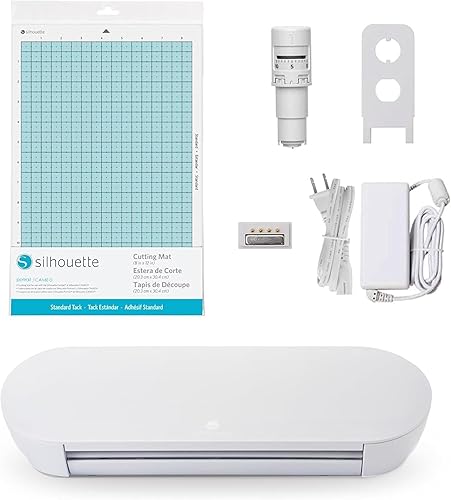
Silhouette Cameo 5 Alpha: Best for mixed media
- 12 x 24 in active surface
- 4-point registration system
- Cuts, sketches and embosses
- AutoBlade included
A full-size electronic cutter with features for print then cut alignment, sketching and a range of materials. Its 12 x 24 in area gives you room for larger layouts than a compact cutter.
Pros
- 12 x 24 in active surface
- 4-point registration for printed images
- AutoBlade and sketch pens adapter included
Cons
- Needs more workspace than a compact cutter
- Studio software is part of the workflow
The Silhouette Cameo 5 Alpha suits crafters who want one electronic cutter for varied projects. Its 12 x 24 in active surface accommodates larger layouts, and it handles materials up to 3 mm thick.
For printed images, its 4-point registration system uses vertical and horizontal corrections to align cuts. The AutoBlade, cutting mat and sketch pens adapter are included, along with Studio software and 100 designs.
The machine also sketches and embosses. Fast Sketch Mode draws designs at higher speeds, while Intelligent Path Technology orders cuts to reduce material stress.
Choose this model if you plan to switch among vinyl, fabric, paper and drawing projects. Skip it if your work is limited to small stickers or physical dies, since its wider digital workflow and workspace would go unused.
Silhouette Portrait 4: Best for narrow workspaces
- 9 in wide cutter
- Studio software
- PixScan and electric tool compatible
- Automatic operation
This narrower electronic cutter fits projects that do not need the wider work area of a full-size machine. Silhouette describes it as quieter and more precise than earlier Portrait models.
Pros
- 9 in format suits smaller projects
- PixScan compatible
- Electric tool options
Cons
- Narrower work area than full-size cutters
- Machine only is included
The Portrait 4 suits smaller vinyl and paper projects where a 9 in cutter width is enough. It supports Studio software, PixScan and electric tool options, giving it more flexibility than a cutter limited to a single blade.
Its belt-driven chassis supports precision, and its IPT technology helps with layered cuts and sharp angles. The machine is compatible with an ES mat, which may matter if your projects call for that setup.
Its narrower format is the main tradeoff against the Cameo models. Choose it for compact work rather than banners or wide shirt graphics, and check that your usual design width fits its cutting format.
Before setup, reserve enough depth for the machine and mat, then install the software and connect the cutter as directed. Keep the mat clean and flat so material sits evenly, and use small, simple designs while you learn how your chosen material feeds.
Skip the Portrait 4 if you expect frequent large layouts or need included accessories beyond the machine. For more on choosing a cutter width, see our guide to electronic die-cutting machines.
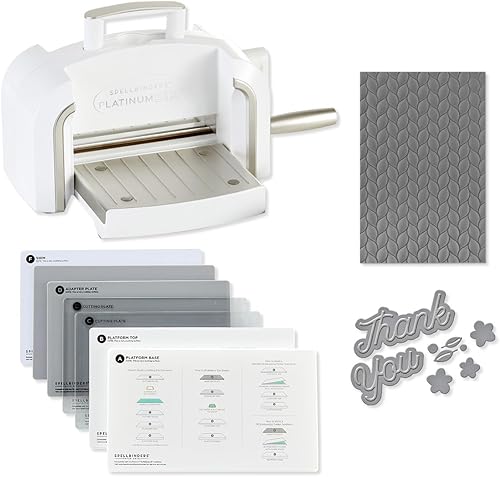
Spellbinders Platinum 6: Best for detailed cards
- Manual die cutting and embossing
- 6 in platform
- Universal Plate System
- Includes 3D embossing folder and die set
A manual machine for making shapes and embossed details with physical dies and folders. Its Universal Plate System is designed to work with a wide range of products.
Pros
- Cuts and embosses
- Universal Plate System
- Portable manual format
Cons
- Uses physical dies and folders
- 6 in platform limits the width of a pass
The Platinum 6 suits card making with physical dies and embossing folders. It has a 6 in platform and a Universal Plate System designed to work with a wide range of products.
The starter set includes a 3D embossing folder and die set, so you can make shaped elements and raised patterns without creating a digital cut file. Spellbinders says the machine is compatible with its BetterPress Letterpress and Glimmer Hot Foil systems.
This is a manual machine, so it follows the dies and folders you feed through it rather than cutting lettering from a digital design. Set up the plates in the order required for the die or folder, keep cardstock aligned, and turn the handle steadily without forcing a stack that resists.
Choose it for repeated shapes, layered paper details and embossing. Skip it if you need custom lettering, long vinyl cuts or designs that change often; those jobs call for digital files and an electronic cutter.
Silhouette Cameo 5 Alpha Plus: Best for wider layouts

- Up to 15 in cutting width
- Fast Sketch Mode
- AutoBlade
- 100 designs included
The wider Cameo format suits longer or broader vinyl layouts. Its automatic blade and Fast Sketch Mode support cutting and drawing in the same craft space.
Pros
- Wider cutting format
- AutoBlade included
- 100 designs included
Cons
- Larger machine needs more workspace
- Check your project material and mat setup before buying
The Cameo 5 Alpha Plus suits wider craft layouts, with a cutting width of up to 15 in and a stated active surface of 15 in x 16 ft. That extra width can help with larger vinyl designs or multiple smaller designs arranged together.
It includes an AutoBlade, a standard tack cutting mat and a sketch pens adapter. Its electrostatic mat supports material up to 0.5 mm thick, and it has a one-touch job repeat feature.
This wider model takes more room than the Portrait 4 and may be unnecessary for cards or small decals. Choose it when your designs regularly exceed a narrower cutter's format, and check your material and mat needs before buying.
For setup, measure both the machine footprint and the space needed to feed long material through it. Keep the roll or mat path clear, and test the design scale in the software before sending a large cut.
Skip it if your workspace is tight or you rarely use the added width. A small cutter will be easier to place and store when most of your designs fit within a narrower format.
Brother ScanNCut SDX125E: Best for scanned designs

- Built-in scanner
- 5 in touchscreen
- 682 built-in designs
- Auto blade
Its built-in scanner can convert a drawing into a cut file or help place a design over scanned material. The machine also has built-in designs and a touchscreen for editing.
Pros
- Built-in scanner
- Can scan and cut printed stickers
- Includes a 12 x 12 in mat
Cons
- Intended for sale in the US at 120 volts
- Brother advises a trial cut to confirm a successful cut
The ScanNCut SDX125E stands out for its built-in scanner, which can turn a drawing into a cut file or help place a cut on scanned material. That can be useful for cutting around printed stickers or positioning an applique shape on fabric.
It includes a 5 in touchscreen, 682 built-in designs and an AutoBlade. Its blade sensor detects material thickness without blade adjustment or material selection, and Brother advises making a trial cut to confirm a successful cut.
The machine is intended for sale in the United States at 120 volts, and other use or sale voids the warranty. Check the power requirements if you're outside the US.
To use the scanner workflow, lay the drawing or material flat, scan it, position the cut on the touchscreen, then make the advised trial cut before using valuable material. Keep the scanned piece from shifting between the scan and cut steps.
Choose this machine if you often work from hand-drawn shapes, printed stickers or material placement that benefits from a scan. Skip it if you do not need the scanner and prefer to create and edit every design on a computer.
Sizzix Big Shot Switch Plus: Best for powered die cutting

- Electric die cutting and embossing
- 9 in opening
- Automated feeder
- 24 Thinlits and 3D embossing folder included
This electric die-cutter feeds cutting plates through the machine for physical dies and embossing folders. It works with Sizzix Thinlits and Bigz dies, but not Bigz Scoreboards.
Pros
- 9 in opening
- Automated feed with one-touch reverse
- Starter kit includes dies and an embossing folder
Cons
- Not suitable for Bigz Scoreboards
- Uses dies and plates rather than digital cut files
The Big Shot Switch Plus suits card makers who want powered feeding for physical dies and folders. Its 9 in opening is wider than the Platinum 6, and the starter kit includes 24 Thinlits and a 3D embossing folder.
An automated feeder moves the cutting plates through the machine, and a one-touch reverse feature helps clear a sandwich if needed. It works with Thinlits and Bigz dies, but not Bigz Scoreboards.
This model does not replace a digital cutter for custom lettering or complex vinyl layouts. Before buying, check that your dies are compatible and that the opening accommodates the shapes you plan to make.
During use, align the die and paper within the plate sandwich, feed it in straight, and use the reverse control if a pass needs to come back out. Avoid forcing plates through a stack that does not move freely.
Choose it when your projects use compatible physical dies and you want an electric feed. Skip it if your main goal is one-off custom shapes or computer-designed vinyl.
Silhouette Cameo PRO: Best for sign makers

- 24 in cutting width
- Built-in roll feeder
- Dual-powered carriage
- Includes heat pen and embossing tool
The wide format is aimed at signs, banners and larger artwork, with a roll feeder and auxiliary rollers for long cuts. Its dual-powered carriage can cut and sketch or use two tools at once.
Pros
- 24 in cutting width
- Built-in roll feeder
- Dual-powered carriage
Cons
- Wide body needs a dedicated workspace
- May be more machine than small card projects need
The Cameo PRO is aimed at extra-wide vinyl and sign work, with a cutting width up to 24 in and a roll feeder. Its auxiliary rollers support long cuts up to 60 ft, which can help with banners or repeated designs.
Its dual-powered carriage can cut and sketch, or use two tools at once. The included kit lists an AutoBlade 2, roll feeder, pen adapter, 24 x 24 in cutting mat, heat pen and embossing tool.
The machine's 34.49 in body width calls for substantial desk space. Set it up where long material can move freely from the roll feeder, and keep the path free of cables, tools and other supplies.
Choose it for signs, banners and repeated wide designs that use the extra reach. Skip it for occasional cards or small decals, since a narrower machine takes less workspace and better matches those projects.
Likcut S501 Vinyl Cutter: Best for tiny stickers

- 4.5 in cutting width
- Bluetooth 5.0 and USB 2.0
- Cutting and drawing modes
- Design store access
Its 4.5 in cutting width and compact design suit small stickers and labels. It supports cutting and drawing, with Bluetooth and USB connection options.
Pros
- Compact format
- Bluetooth and USB options
- Cutting and drawing modes
Cons
- Narrow cutting width
- Design store needs internet access
The Likcut S501 fits small sticker and label projects with a 4.5 in cutting width and compact design. It supports cutting and drawing, with adjustable pressure settings and Bluetooth 5.0 or USB 2.0 connections.
LIKCUT says its Design Store has over 1 million designs and more than 1,200 fonts, and the machine supports over 50 material types. The Design Store needs internet access, so consider that if you prefer an offline workflow.
Its narrow width makes it a poor fit for large shirt graphics or wide signs. Choose it for small designs and a compact workspace, after checking whether the design software fits your devices.
For a clean first cut, connect through Bluetooth or USB, select a small design, and adjust pressure for the chosen material. Keep the material aligned and avoid assuming a design library item will fit the 4.5 in working width without resizing.
Skip this model if you need broad material support with detailed setup controls or regularly make larger projects. Its compact size is most useful when the work itself stays small.
VEVOR 12-Inch Vinyl Cutter: Best for scored projects

- 12 in format
- Cut, write and score
- USB, Bluetooth and USB drive access
- Works with cardstock and vinyl
This cutter combines cutting with writing and scoring for decals, cards and folded projects. Its software supports several image formats, including PNG, JPG, SVG and TIF.
Pros
- Cutting, writing and scoring functions
- Multiple connection options
- Supports cardstock, vinyl and specialty paper
Cons
- One cutting machine included
- Check software and device compatibility for your setup
The VEVOR cutter offers cutting, writing and scoring for buyers who want one machine for decals and folded paper projects. It supports USB, Bluetooth and USB drive access, and the stated formats include PNG, JPG, SVG and TIF.
VEVOR says the cutter works with vinyl, heat transfer paper, cardstock, foil and specialty paper. Its software includes design tools for text and graphics and can be used online or offline.
Compare the software and connection options with your devices before choosing it. The stated input voltage is 240 volts, so confirm that this matches your power setup.
For a first card project, choose a simple design, set the tool for the intended job, and make a small trial on spare cardstock. A score line is meant to guide a fold, so position and check it before cutting out the full card.
Choose this model if you want cutting, writing and scoring in one digital workflow. Skip it if you need a scanner, a very wide cutting format or a manual die-and-folder system.
How should you choose a Cricut alternative?
Choose by project width and whether you want digital cutting or physical dies. Those two decisions narrow the field faster than comparing every feature.
Which Cricut alternative fits cards?
For custom digital shapes and lettering, choose an electronic cutter sized for your cardstock and designs. For embossed details and repeatable shapes, the Platinum 6 or Big Shot Switch Plus uses physical dies and folders; the Switch Plus has the wider opening.
Before buying, list the card sizes and shapes you make most, then compare them with the machine opening or cutting area. Remember that a die cutter is limited to the dies you own, while an electronic model needs a software and file workflow.
Our guide to manual die-cutting machines explains how physical dies, plates and machine openings affect card projects.
Which Cricut alternative fits vinyl?
For decals and shirt graphics, consider the Cameo 5 Alpha or Portrait 4 based on design width. The Cameo 5 Alpha Plus and Cameo PRO offer wider formats for large layouts, while the Likcut S501 is sized for small sticker work.
Before cutting a long or costly piece, check the design dimensions, material alignment and tool selection in the software. For iron-on work, confirm that the selected material and cutting instructions suit the project, then weed slowly so small details stay in place.
For shirts, compare the machines in our Cricut and Silhouette t-shirt guide. Check the supported material, mat and tool setup for your chosen machine before planning a project.
Which Cricut alternative fits fabric?
The Cameo 5 Alpha, Cameo 5 Alpha Plus and Brother ScanNCut are described for fabric. Fabric type and backing can change how a cut behaves, so follow the machine instructions and make a test cut when advised.
Keep fabric flat and secured before feeding it, and start with a simple shape that has no tiny points. A scanner can help place a shape on scanned material, while a digital design workflow is more suitable when you need repeated custom outlines.
For more material guidance, see what a die-cutting machine can cut.
What mistakes should you avoid with Cricut alternatives?
The most common buying mistake is choosing by feature count instead of the size and kind of projects you make. A 24 in cutter adds little value for small cards, while a manual machine cannot make a custom vinyl word from a digital file.
Avoid assuming that every tool, mat, die or material works across machines. Check the stated compatibility, measure your workspace, confirm the power requirements, and run a trial cut on spare material when the instructions recommend it.
Which Cricut alternative should you choose?
Choose the Cameo 5 Alpha for a full-size electronic cutter that handles varied projects, the Portrait 4 for smaller work, and the ScanNCut when scanning drawings or material placement matters. Pick the Platinum 6 or Switch Plus for physical dies and embossing, and the Cameo PRO for extra-wide vinyl work.
If you mainly make cards, let the die and platform size guide your choice. If you make vinyl or fabric projects from custom files, compare the width, setup and workspace you need, then explore our craft cutting machine guide before deciding.
Our top 3 picks at a glance
-
1
-
2
-
3
Frequently asked questions
What is the best Cricut alternative for vinyl?
The Silhouette Cameo 5 Alpha is a strong all-purpose option, with a 12 x 24 in active surface and a 4-point registration system for printed images. For wider vinyl layouts, consider the Cameo 5 Alpha Plus or Cameo PRO, which offer wider cutting formats.
Choose based on project width and available workspace.
Which Cricut alternative is best for making cards?
For digital cutting and scoring, compare an electronic cutter with the functions and work area your card designs need. For physical dies and embossing folders, the Spellbinders Platinum 6 and Sizzix Big Shot Switch Plus are manual options, with 6 in and 9 in formats respectively.
Check die and plate compatibility before choosing.
Can Cricut alternatives cut fabric?
Some options here are described for fabric, including the Silhouette Cameo 5 Alpha, Cameo 5 Alpha Plus and Brother ScanNCut SDX125E. Material results depend on the fabric, blade, mat and settings, so use the machine instructions and make a trial cut where advised.
See our guide to cutting fabric and felt with a die-cutting machine.
Are manual or electronic cutting machines better?
Manual machines use physical dies and plates, which can suit repeated shapes and embossed card details. Electronic cutters follow digital designs and can handle lettering, custom shapes and vinyl layouts.
Our guide to craft cutting machine types explains how to match the machine style to your projects.


