9 Best Cricut and Silhouette Machines for T-Shirts (October 2026)
The best Cricut and Silhouette machines for T-shirts include the Cricut Maker 5 Essential for varied apparel crafts, the Cricut Maker 4 T-Shirt Bundle for a heat press in the box, and the Silhouette Cameo 5 Alpha for a larger cutting mat.
On this page (3 sections)
The Cricut Maker 5 Essential is the best Cricut for T-shirts for most crafters, with tools and materials for apparel and other projects. Choose the Maker 4 T-Shirt Bundle if you want a heat press in the same bundle, or the Silhouette Cameo 5 Alpha if you want a Silhouette cutter with a 12 in x 24 in mat.
A shirt cutter cuts a design from iron-on material; it does not apply the design to the garment. Plan for both the cutter and a heat source, and follow the transfer material’s instructions for temperature, pressure and time.
For help choosing between machine types, see our craft cutting machine guide. If you’re deciding between two larger models, our Cameo 5 vs Maker 4 comparison explains how their features differ.
Our picks at a glance
-
1

-
2

-
3

- 4
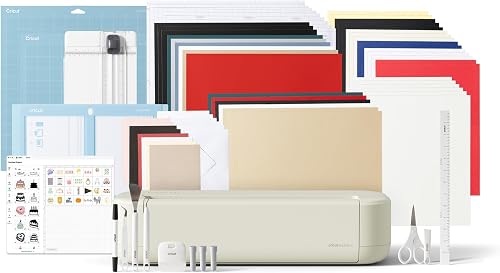 Best for everyday iron-on projectsCheck it
 - 5
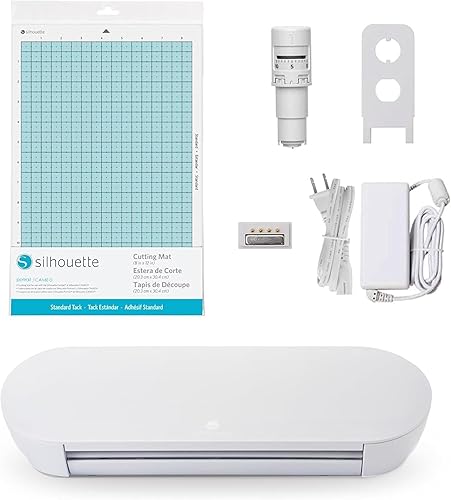 Best for a compact SilhouetteCheck it
 - 6
 Best for starting with iron-onCheck it
 - 7
 Check it
Cricut Joy Xtra Vinyl Starter Kit
Best for small shirt designs - 8
 Best for iron-on plus a mini pressCheck it
 - 9
 Check it
Cricut Joy Xtra Smart Vinyl Bundle
Best for vinyl details on shirts
Which Cricut and Silhouette machines work best for T-shirts?
The best choice depends on design size, whether you need a heat press and how many other materials you plan to cut. These picks range from compact machines for small graphics to bundles with apparel supplies and pressing tools.
Cricut Maker 5 Essential: Best for varied apparel crafts
- Works with 300+ materials
- 12 in cutting performance
- Includes tools and materials for up to 65 projects
Its broad material range and included supplies make this a flexible pick for apparel and other crafts. The bundle includes an engraving tool and a Premium Fine Point Cutting Tool.
Pros
- Broad material range
- Includes tools and project materials
- Works with 13 tools
Cons
- Some specialty tools are sold separately
- Full content library requires a paid subscription
The Maker 5 Essential is the highest-scoring pick here and a versatile option for someone who plans to make shirts alongside other crafts. It works with 300+ materials, including iron-on, vinyl, cardstock and fabric, and supports 13 tools for cutting, writing, scoring, engraving and other tasks.
The bundle includes a Premium Fine Point Cutting Tool, scoring and engraving tools, printable vinyl, insert card sets and other supplies. Cricut says the supplies are enough for up to 65 projects, with an average project size of 4 in x 6 in using included materials.
For apparel, you can use it to cut iron-on designs and then apply them with a suitable heat source. Its 12 in cutting performance gives you room to plan a range of shirt graphics, while compatible tools and materials may be sold separately.
Choose it if you want one machine for shirts, fabric projects and paper crafts. If you want pressing equipment in the bundle, the Maker 4 bundle with a heat press includes it.
Cricut Maker 4 T-Shirt Bundle: Best for a heat press in the box
- Maker 4 cutting machine
- EasyPress SE heat press
- Vinyl and iron-on materials
This bundle pairs a cutter with an EasyPress SE heat press and iron-on materials. It suits someone starting apparel projects who wants cutting and pressing equipment together.
Pros
- Includes a heat press
- Includes vinyl and iron-on materials
- Made for apparel projects
Cons
- Larger bundle than a cutter alone
- Follow the transfer material's instructions
The Maker 4 T-Shirt Bundle is the most direct apparel package in this roundup because it includes a cutter, EasyPress SE heat press, iron-on materials, tools and accessories. Its four-step workflow is design, cut, press and apply.
The bundle is aimed at custom clothing and tote bags. Cricut says the EasyPress SE provides even heat and pressure, and includes auto-shutoff and a heat base.
A heat press does not remove the need to follow transfer material instructions. Check the suitable temperature, pressure and timing for the iron-on you use, and make sure the design fits the shirt before cutting.
Pick this bundle if you want both the cutter and press together. If you already have a heat press, the Cameo or a Cricut bundle with general craft supplies may make more sense.
Silhouette Cameo 5 Alpha: Best for a larger cutting mat
- 12 in x 24 in cutting mat
- 4-point registration system
- AutoBlade and Studio software included
The Cameo 5 Alpha includes a 12 in x 24 in cutting mat and a 4-point registration system. Those details suit buyers who want a Silhouette machine for apparel designs and print-and-cut work.
Pros
- Larger included mat
- Registration system for printed images and heat transfers
- AutoBlade included
Cons
- The cutting mat takes more workspace
- Some features may take time to learn
The Cameo 5 Alpha is the Silhouette pick for buyers who want a larger included mat and features for accurate print-and-cut work. Its 12 in x 24 in mat gives you a longer work area than the Portrait 4's 9 in cutting width.
Silhouette includes an AutoBlade, cutting mat, sketch pens adapter, 100 designs and Studio software. The machine also has a 4-point registration system for aligning printed images and heat transfers, plus Intelligent Path Technology that optimizes cut order.
Silhouette describes the machine as cutting at speeds up to 400 mm/s and operating quietly. Those features may matter if you make detailed designs at home or share your workspace.
Choose the Cameo when the longer mat fits your work area and project plans. If you want a smaller cutter for modest designs, compare it with the Silhouette Portrait 4.
Cricut Explore 5 Deluxe: Best for everyday iron-on projects
- Works with 100+ materials
- 12 in cutting performance
- Bundle supplies for up to 100 projects
This 12 in Cricut bundle handles iron-on alongside vinyl, cardstock and printable materials. Its Smart Iron-On and other included supplies give you several project types to try.
Pros
- Includes Smart Iron-On
- Supplies for up to 100 projects
- Bluetooth connection to Design Space
Cons
- Deep Cutting Tool is sold separately
- An inkjet printer is needed for print-then-cut designs
The Explore 5 Deluxe suits a crafter who wants a 12 in Cricut for apparel plus paper and vinyl work. It cuts 100+ materials, including iron-on, vinyl, cardstock and printable materials.
The Deluxe bundle includes Smart Iron-On, Smart Vinyl, cardstock, insert card sets and printable vinyl, with supplies for up to 100 projects. Cricut says the machine supports writing, drawing, foiling and scoring with compatible tools.
For shirts, the included iron-on material gives you a starting point, but you still need a separate heat source. It can suit you if you want shirt projects without a bundle that includes a press.
Pick the Explore 5 Deluxe for varied projects and included materials. If you want a heat press with the machine, the Explore 5 Ultimate bundle includes a mini press.
Silhouette Portrait 4: Best for a compact Silhouette
- 9 in cutting machine
- Studio software
- Quieter, more precise redesign
The Portrait 4 is a 9 in Silhouette cutter for smaller apparel designs and a tight craft space. Its narrower cutting width makes it useful to check your design dimensions before choosing.
Pros
- Narrower than a 12 in cutter
- Includes Studio software
- Supports electric tool options
Cons
- Smaller cutting width than the Cameo
- Machine-only package
The Portrait 4 is the compact Silhouette choice for small shirt graphics and limited craft space. Its 9 in cutting width is narrower than the Cameo 5 Alpha's included mat, so measure your intended design before choosing it.
The machine includes Studio software and supports electric tool options for work beyond cutting and sketching. Silhouette describes the Portrait 4 as a quieter, more precise redesign of its 9 in cutter.
A compact machine can suit pocket designs, small chest graphics and other modest projects. It may be less suited to buyers who expect to cut broad front or back designs in one piece.
Choose it if small designs are your norm and you want to stay with Silhouette. For a wider machine, read our Cameo vs Portrait size comparison.
Cricut Maker 4 Starter Kit: Best for starting with iron-on
- Maker 4 cutting machine
- Vinyl and iron-on sampler sheets
- Cutting mat, blade and tools
This starter kit combines the Maker 4 with a cutting mat, tools, vinyl and iron-on sampler sheets. It gives a new user supplies for apparel and other crafts without a heat press.
Pros
- Includes iron-on material
- Includes mat and tools
- Supports varied craft projects
Cons
- Does not include a heat press
- May include more capability than a shirt-only crafter needs
The Maker 4 Starter Kit gives beginners a Cricut cutter with vinyl and iron-on sampler sheets, plus a mat, blade, tools and project inspiration. It supports shirts and other projects such as stickers, cards and personalized gifts.
Unlike the Maker 4 T-Shirt Bundle, this kit does not include a heat press. It may fit if you already have a suitable press or plan to choose one separately.
The bundle is for someone who wants a broad-capability cutter and supplies to try. Cricut says the Maker 4 works with 300+ materials, including iron-on and vinyl, and supports 13 compatible tools.
Choose it if you want a starter kit but don’t need a press in the bundle. If shirts are your main focus and you need pressing gear too, compare the Maker 4 T-Shirt Bundle.
Cricut Joy Xtra Vinyl Starter Kit: Best for small shirt designs
- Works with 50+ materials
- Cuts iron-on HTV
- Includes StandardGrip mat and tools
Joy Xtra fits smaller apparel designs and craft spaces. It works with iron-on HTV, and the kit includes a mat, vinyl sampler, transfer tape and tools.
Pros
- Compact option for smaller designs
- Includes a mat and tools
- Print-Then-Cut works with most inkjet printers
Cons
- Narrower project space than 12 in machines
- Not the best fit for large shirt graphics
Joy Xtra is the Cricut option for small shirt designs and a compact craft setup. It works with 50+ materials, including iron-on HTV, and the vinyl starter kit includes a StandardGrip mat, vinyl sampler, transfer tape and tools.
The machine also cuts, draws and foils, and its Print-Then-Cut feature works with most inkjet printers for full-color designs. Print-Then-Cut is for printable materials; it does not replace iron-on when you want a wearable transfer.
Before buying, compare the design width you need with the machine's working area. Small chest graphics and pocket designs may fit better than large front or back prints.
Choose Joy Xtra for compact projects and a starter set of materials. For a broader look at its place in Cricut’s range, see our Cricut Joy 2 review.
Cricut Explore 5 Ultimate: Best for iron-on plus a mini press
- Works with 100+ materials
- Includes EasyPress Mini LT
- Bundle supplies for up to 135 projects
The Ultimate Bundle adds an EasyPress Mini LT to the Explore 5 and its materials. It suits smaller heat-transfer projects, while a mini press may be less convenient for larger shirt designs.
Pros
- Includes a heat press
- Includes Smart Iron-On
- Supplies for up to 135 projects
Cons
- Mini press has a smaller working area
- Some tools and materials are sold separately
The Explore 5 Ultimate pairs a 12 in Cricut with apparel supplies and an EasyPress Mini LT. The bundle includes Smart Iron-On and supplies for up to 135 projects.
It works with 100+ materials, including iron-on and vinyl, and suits shirt designs alongside cards, decals and other crafts. The included mini press can be handy for smaller areas, but its size may be less convenient for a large chest graphic.
For heat-transfer projects, follow the material's directions and use a press suitable for the garment and design. Check compatibility before applying a transfer to a fabric.
Pick this bundle if you want a press for smaller transfers and craft supplies for more projects. Choose the Maker 4 T-Shirt Bundle if its apparel-focused press setup better suits your plans.
Cricut Joy Xtra Smart Vinyl Bundle: Best for vinyl details on shirts
- Joy Xtra machine
- Rainbow Smart Vinyl and transfer tape
- Smart Vinyl loads without a mat
This Joy Xtra bundle centers on permanent Smart Vinyl, which loads without a mat. It may suit shirt projects using vinyl details, but check that the material fits your garment and application.
Pros
- Includes vinyl and transfer tape
- Smart Vinyl loads without a mat
- Tools included
Cons
- Bundle centers on permanent vinyl, not iron-on
- Compact machine limits design width
This Joy Xtra bundle suits shirt makers who want to add vinyl details using Smart Vinyl without a mat. It includes rainbow permanent vinyl, transfer tape and tools, with the machine for labels, decals and custom projects.
Permanent vinyl and iron-on HTV serve different purposes. For wearable designs, choose material intended for garments and follow its application directions.
The Joy Xtra can also work for small decals and labels around the craft room. Its included materials focus on vinyl projects rather than a complete shirt-making setup.
Choose this bundle for vinyl decals and small craft projects. For shirts, the Cricut Joy Xtra iron-on starter kit is a closer match because it includes iron-on HTV.
How should you choose a Cricut or Silhouette for shirts?
Start with the largest design you expect to make, then decide whether you need a heat press included. A machine that fits a small pocket graphic may be frustrating for a large back print.
What design size fits your Cricut for T-shirts?
A 12 in machine gives more width than a 9 in cutter, but the usable area depends on the machine, mat and material setup. Measure the shirt and the finished design area before buying.
The Cameo 5 Alpha includes a 12 in x 24 in mat, while the Portrait 4 is a 9 in cutter. Cricut's Maker 5 and Explore 5 have 12 in cutting performance.
Should you get a bundle with a heat press?
A heat press bundle can simplify a first apparel setup because the cutter, iron-on material and press are together. The Maker 4 T-Shirt Bundle includes an EasyPress SE, and the Explore 5 Ultimate includes an EasyPress Mini LT.
If you already have a press, a cutter bundle without one may suit you better. Follow the heat-transfer material's instructions for time, temperature and pressure.
Is Cricut or Silhouette easier for your workflow?
Choose based on the software and machine family you prefer, along with the project size you need. Cricut machines in this roundup connect to Design Space, while the Silhouette picks include Studio software.
Both brands offer options for apparel, but their bundles differ. Compare the included tools and supplies with what you already own before choosing by brand name alone.
For a broader look at the decision, see our guide to Cricut alternatives for cards, vinyl and fabric. If you’re weighing machine types, our checklist for choosing a cutting machine can help narrow the fit.
Which Cricut and Silhouette machine should you buy for T-shirts?
Choose the Maker 5 Essential if you want a versatile Cricut for apparel and other crafts. Pick the Maker 4 T-Shirt Bundle if you want a heat press included, and the Cameo 5 Alpha if Silhouette and a longer mat fit your workflow.
For small graphics, the Portrait 4 or Joy Xtra can fit a compact setup. Before you order, compare your largest design with the cutter’s working area and confirm that your heat-transfer materials match the garment.
Our top 3 picks at a glance
-
1
-
2
-
3
Frequently asked questions
What is the best Cricut for T-shirts?
The Cricut Maker 5 Essential is the best Cricut for T-shirts in this group if you want a versatile cutter and project supplies. Choose the Maker 4 T-Shirt Bundle if you want a heat press included, or an Explore 5 bundle if iron-on shirts are one of several crafts you plan to make.
Check the design width and press size before choosing.
Can a Cricut or Silhouette cut iron-on vinyl?
The Cricut and Silhouette models here support iron-on or heat-transfer projects in some form. The Cricut Joy Xtra works with iron-on HTV, and the Cameo 5 Alpha is described for heat transfers.
Use material made for garment transfers and follow its cut, weed and pressing instructions.
Do I need a heat press to make T-shirts?
You need a way to apply the heat-transfer material to the shirt. Two picks here include a press: the Maker 4 T-Shirt Bundle has an EasyPress SE, and Explore 5 Ultimate includes an EasyPress Mini LT.
A separate heat press can also work if it matches the transfer material's instructions.
Is a 9 in cutter wide enough for shirt designs?
A 9 in cutter can suit smaller shirt designs, such as a pocket graphic or a modest chest motif. A 12 in machine gives more width for larger designs, though the usable area depends on the mat, material and machine setup.
Measure your target design and shirt before you choose.
Can I use permanent vinyl on a T-shirt?
Permanent adhesive vinyl is made to stick to surfaces, while iron-on HTV is designed for garment transfers. The Joy Xtra Smart Vinyl bundle includes permanent vinyl, so check the material instructions before applying it to clothing.
For wearable designs, choose iron-on material intended for fabric.


