Silhouette Cameo 5 vs Cricut Maker 4: Which Is Better? (October 2026)
For silhouette cameo 5 vs cricut maker 4, choose the Cameo 5 Alpha for quieter cutting and print registration, or the Maker 4 for a wider range of materials and tools. Match the machine to your main projects, software needs and starter supplies.
On this page (9 sections)
- Silhouette Cameo 5 vs Cricut Maker 4: what is the main difference?
- Which machine fits your cutting projects?
- Which machine is better for stickers and print then cut?
- Which cutter handles more materials and techniques?
- What comes in each bundle?
- How do the software options compare?
- Which machine is quieter in a shared home?
- How should you set up and care for either cutter?
- Which machine should you choose?
For silhouette cameo 5 vs cricut maker 4, the Cricut Maker 4 is the stronger fit for varied materials and techniques, while the Silhouette Cameo 5 Alpha suits quieter work and printed designs. The Maker 5 Essential is a third option if you want Cricut’s machine with a larger starter bundle.
The Maker 4 works with 300+ materials and supports several tool-based techniques. The Cameo 5 Alpha emphasizes print registration, sketching and quiet operation.
The Maker 5 Essential includes tools and supplies for a range of projects.


Silhouette Cameo 5 vs Cricut Maker 4: what is the main difference?
The Maker 4 offers a broader stated range of materials and tool functions, while the Cameo 5 Alpha emphasizes quieter operation, print registration and sketching. Both support printed design workflows, but their software and included accessories differ.
Cricut names materials such as leather, wood, vinyl, iron-on HTV, cardstock and stickers. The Maker 4 also supports foiling, scoring, engraving, debossing and perforating with compatible tools.
Silhouette highlights a 4-point registration system with vertical and horizontal corrections for printed images, stickers and heat transfers. Its Intelligent Path Technology optimizes cutting order, and Fast Sketch Mode draws designs at higher speeds.
For choosing between them, focus on the work you repeat most. If you mainly cut vinyl and cardstock, a long list of specialty functions may not matter as much as software and setup; if your projects span materials and techniques, the Maker 4’s range deserves more weight.
Which machine fits your cutting projects?
The Maker 4 suits mixed-material craft work, while the Cameo 5 Alpha suits printed projects, sketching and quieter workspaces. Your material list and design routine are better guides than a general claim that one cutter is best.
For paper crafts, both can handle cutting tasks, but choose based on how you create designs and which bundled tools you will use. For apparel or home décor, consider the material and any stabilizer or specialty tool each project needs before buying.
For a broader view of machine types, see our guide to electronic die-cutting machines for paper crafts. If you’re weighing powered cutters against hand-cranked options, our manual vs electronic die-cutting machine guide explains the basic tradeoffs.
How should you choose between Silhouette Cameo 5 and Cricut Maker 4?
Choose the Cameo for quiet operation and print alignment, and choose the Maker 4 for more material and technique options. Those are the clearest differences to use when narrowing the choice.
Make a short list of your next three projects. Include the main material, whether you need printed alignment, whether you want to draw or engrave, and what software you are comfortable using.
If those projects are mostly stickers, printed images or sketching, the Cameo 5 Alpha’s registration and sketch features match that use. If they mix materials such as vinyl, leather, wood and cardstock, the Maker 4’s stated material range and tool functions are a more useful fit.
Skip the Maker 4 if you expect to use only simple cuts and would not benefit from its wider functions. Skip the Cameo if you need Cricut’s Design Space workflow or want the Maker 4’s broader stated material range.
Which machine is better for stickers and print then cut?
Both support printed designs, but the Cameo 5 Alpha highlights a 4-point registration system, while the Maker 4 has a Print-Then-Cut feature. Your printer, paper and design workflow can determine which one fits your sticker projects.
The Cameo’s registration system uses vertical and horizontal corrections to align printed images, stickers and heat transfers. Silhouette also describes its cutting path technology as a way to produce smoother cuts with less material stress.
Cricut’s Print-Then-Cut feature works with most inkjet printers. Design Space is Cricut’s design app, and the Maker 4 bundle includes 30 bonus images.
For the best chance of a clean result, use a flat, unwrinkled sheet and keep the printed registration marks clear. Follow the software’s material and alignment prompts, and make a small sample before committing a full sheet.
What should you check before making stickers?
Check the complete path from design to finished sticker: software, printer support, alignment steps and material settings. A feature name alone does not tell you whether a workflow suits your computer, printer or file habits.
The Cameo 5 Alpha bundle includes Studio software, and Cricut connects its machines to Design Space. Cricut describes a free content library, while access to its full library requires an optional paid Cricut Access subscription.
Consider whether you’ll make original artwork or use ready-made images. If you rely on a content library, compare what is available without a subscription with what you would need to pay for.
For cardstock projects, our guide to cutting cardstock with a Cricut covers basic material considerations. For stickers, confirm your printer supports the chosen media and follow the cutter’s alignment steps before cutting a full batch.
Which cutter handles more materials and techniques?
The Maker 4 has the broader stated range of materials and tool functions. Its compatible materials include leather, wood, vinyl, iron-on HTV, cardstock and stickers; supported functions include cutting, drawing, foiling, scoring, engraving, debossing and perforating.
That range may help if you want one machine for paper crafts, apparel and other projects. Some specialty tools are sold separately, so supported functions do not mean every required tool comes in the box.
The Cameo 5 Alpha handles materials up to 3 mm thick and can cut, sketch and emboss. Its stated media types include banner paper, cardstock, fabric, glossy film and glossy photo paper.
Those descriptions point to different strengths, rather than a simple count that predicts every result. Check the machine’s material guidance and the tools required for your specific project.
Can either machine cut fabric?
Both product descriptions include fabric as a supported material. The Cameo 5 Alpha lists fabric among its media types and handles material up to 3 mm thick; Cricut includes fabric among the Maker 4’s compatible materials.
Fabric type, stabilizer and blade condition can change the result. Start with a scrap, secure the fabric flat and use the machine’s material guidance to select a suitable setting.
Our guide to cutting fabric and felt with a die-cutting machine covers practical choices for fabric projects. For Cricut users, the Cricut blade types guide explains how blade choice relates to materials and cuts.
What comes in each bundle?
The Maker 4 bundle includes a blade, pen, mat, weeder and material samples, while the Cameo 5 Alpha bundle includes a blade, mat, sketch pens adapter, designs and software. Compare those contents with the supplies you already own.
The Maker 4 bundle includes a Fine-Point Blade, materials sampler, Fine Point Pen, Light Grip Mat, weeder and 30 bonus images in Design Space. The sampler includes Smart Vinyl, matless vinyl, Smart Iron-On, matless heat transfer vinyl, cardstock and transfer tape.
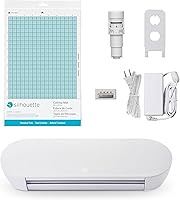
The Cameo 5 Alpha includes an AutoBlade, cutting mat, Sketch Pens Adapter, 100 designs and Studio software. That mix suits someone who wants to begin with sketching as well as cutting.
The Maker 5 Essential bundle includes tools and materials for a range of projects, with supplies described as enough for up to 65 projects. It also includes 25 additional images and 1 font.
Is the Maker 5 Essential bundle worth comparing?
Compare the Maker 5 Essential if you want a Cricut machine with a large starter bundle. It works with 13 tools and includes a Premium Fine Point Cutting Tool, Scoring Tool, Engraving Tool and popular materials.
The machine has 12 in cutting performance and works with materials up to 3 mm thick, including leather and foam core board. Some specialty tools and accessories are sold separately, so check that the bundle covers the projects you actually plan to make.
A bundle is useful when its contents match your work. If most of the supplies would sit unused, the Maker 4 or Cameo may be a better fit for your setup.
If you’re weighing other Cricut models, our Cricut Joy Xtra vs Explore 5 comparison can help you decide whether a smaller or full-size machine fits your project scale.
How do the software options compare?
Choose the software that fits your design habits and devices. The Cameo 5 Alpha includes Studio software, while Cricut machines connect with the Design Space app.
Cricut describes Design Space as an easy-to-learn app with a free library of 3,000+ images and 100+ fonts. The full content library requires an optional paid Cricut Access subscription.
The Cameo package includes Studio software and 100 designs. Before buying, check the current software requirements, device support and file handling if those details matter to your workflow.
Write down the devices you use for design, the file types you use and whether you need a paid library. A cutter with suitable features can still be inconvenient if its software does not fit your routine.
Which machine is quieter in a shared home?
The Cameo 5 Alpha is the clearer fit if noise is a priority, because Silhouette describes its operation as whisper-quiet. The information available here gives no matching noise figure for the Maker 4, so it does not support a direct noise comparison.
Noise matters if you craft near other people or work during quiet hours. The Cameo’s motor cuts at speeds up to 400 mm/s, but speed alone does not tell you how loud a particular job will sound.
If your choice depends heavily on noise, check current manufacturer guidance and consider where you’ll place the machine. A stable work surface and room for mats and materials also make setup easier.
How should you set up and care for either cutter?
Set up the cutter on a stable surface, connect its software and device, then confirm the blade, mat and material before a first project. A small practice cut can help you catch setup mistakes before using valuable material.
Keep the work area clear so the mat or material can move through the machine without catching on nearby objects. Load materials flat and in the orientation the software shows, then check that the selected material matches what is on the mat.
Keep blades and mats free of scraps, dust and adhesive buildup. Remove scraps carefully, store blades safely and replace worn or damaged cutting surfaces when they stop holding material securely.
For fabric, stabilize the material as needed and test a scrap first. For stickers, keep registration marks visible and avoid shifting the printed sheet after it has been prepared for cutting.
What mistakes should you avoid?
The most common avoidable problems are choosing the wrong material setting, using a worn blade and skipping a small sample cut. Each can waste material or leave you with a cut that does not match the design.
Do not assume that a machine’s material range means every material uses the same blade, mat or pressure. Check the instructions for the specific material and tool combination.
For print-and-cut work, leave registration marks unobstructed and keep the paper in place after printing. For fabric, flatten the piece and test the chosen setup on a scrap before cutting the final shape.
Do not buy a bundle based only on the number of included items. Compare the actual tools and supplies with your project list, then account for any specialty tools you may need to add.
Which machine should you choose?
Choose the Maker 4 for varied materials and techniques, the Maker 5 Essential for its included supplies, or the Cameo 5 Alpha for quiet operation and print alignment. For silhouette cameo 5 vs cricut maker 4, decide by the projects you repeat, not by the longest feature list.
Pick the Maker 4 if you want to work across many material types and techniques. Its 300+ material compatibility, Print-Then-Cut feature and tool functions suit a mixed project list.
Pick the Maker 5 Essential if you want a Cricut bundle with supplies for several kinds of projects. Check that its included tools and materials are useful for your plans before choosing it.
Pick the Cameo 5 Alpha if printed alignment, sketching and quieter operation matter more to you. Its registration system, Fast Sketch Mode and included Studio software make it the focused choice for that workflow.
If you’re comparing more brands and machine types, our guide to Cricut alternatives for cards, vinyl and fabric offers another view of the options. For more buying criteria across machine types, see our craft cutting machine guide.
How we scored these machines
Our scores weigh features and bundle contents against what this comparison’s buyers need. The Maker 4 scores 8.7 for material and tool range; the Maker 5 Essential scores 8.5 for its project-ready bundle; the Cameo 5 Alpha scores 8.2 for print registration, sketching and quieter operation.
Your preferred software, materials and included accessories may shift which option fits you best. Use the score as a quick summary, then make the final choice from your own project list.
Frequently asked questions
Is the Silhouette Cameo 5 Alpha better than the Cricut Maker 4?
The Cameo 5 Alpha fits quieter workspaces and print alignment needs, while the Maker 4 offers 300+ compatible materials and more tool functions. Choose based on your most common projects, preferred software and the tools you need.
Neither machine is the right fit for every crafter.
Can both machines make stickers?
Both support printed design workflows. The Cameo 5 Alpha has a 4-point registration system for aligning printed images and stickers, while the Maker 4 offers Print-Then-Cut with most inkjet printers.
Check the software workflow for your printer and sticker material before choosing.
Which machine is better for fabric?
Both product descriptions include fabric among their supported materials. The Cameo 5 Alpha handles materials up to 3 mm thick, and Cricut includes fabric among the Maker 4’s compatible materials.
Check the right blade, mat and settings for your fabric, then start with a scrap.
Does the Cricut Maker 4 include every tool?
No. Its bundle includes a Fine-Point Blade, pen, Light Grip Mat, weeder and materials sampler, but some specialty tools are sold separately.
The Maker 4 supports functions such as engraving, debossing and perforating when you have compatible tools.
What is the difference between Cricut Maker 4 and Maker 5 Essential?
Both Cricut machines list compatibility with 300+ materials, but the Maker 5 Essential bundle includes supplies for up to 65 projects and works with 13 tools. The Maker 4 bundle includes a materials sampler, pen, Light Grip Mat and weeder.
Compare the included supplies with the tools and materials you already have.