Silhouette Cameo vs Portrait: Which Size Do You Need? (October 2026)
Choose a Cameo for wider projects and the Portrait 4 for designs that fit within 9 in. This Silhouette Cameo vs Portrait comparison comes down to your usual material size, work surface and need for longer cuts.
On this page (9 sections)
- Silhouette Cameo vs Portrait: which size fits your projects?
- What does the Cameo 5 Alpha add for print-and-cut work?
- When is the Portrait 4 the better choice?
- Who should consider the Cameo 5 Alpha Plus?
- Which machine suits stickers and print-and-cut?
- How should you set up and care for a Silhouette cutter?
- How much space should you leave around a cutter?
- What else should you compare before buying?
- Which Silhouette cutter should you choose?
Choose a Cameo for wider projects and the Portrait 4 for designs that fit within 9 in. This Silhouette Cameo vs Portrait comparison is about your usual material size, your work surface and whether you need long cuts.
The Cameo 5 Alpha has a 12 x 24 in active surface. The Portrait 4 is a 9 in cutter, while the Cameo 5 Alpha Plus offers a stated cutting width of up to 15 in.
Those differences shape the work each machine suits. A smaller cutter handles narrow designs and fits a tighter table; a wider model gives larger layouts more room.

Silhouette Cameo vs Portrait: which size fits your projects?
Pick the Portrait 4 if your regular projects fit within 9 in, and a Cameo if they need more width. Measure a finished design, including margins, before deciding.
The Cameo 5 Alpha has a 12 x 24 in active surface. The Portrait 4 has an 81 square inch active surface and is a 9 in cutter.
The Cameo 5 Alpha Plus has a stated cutting width of up to 15 in and an active surface of 15 in x 16 ft. Its longer format may suit extended designs, but the machine itself is wider too.
A banner, wide sign or large group of decals may need to be split into sections on the Portrait. That can work if you are comfortable planning separate cuts and lining up the pieces.
How wide is a Cameo compared with a Portrait?
The machine widths are 22.28 in for the Cameo 5 Alpha, 9 in for the Portrait 4 and 25.28 in for the Cameo 5 Alpha Plus. Use those measurements to check your table, shelf or storage spot.
Machine width is only part of the space you need. Leave room to load material and keep its path clear while a project runs.
If you are comparing other electronic models too, our Silhouette Cameo 5 vs Cricut Maker 4 comparison looks at two full-size options. For a smaller Cricut choice, see Cricut Joy Xtra vs Explore 5.
What does the Cameo 5 Alpha add for print-and-cut work?
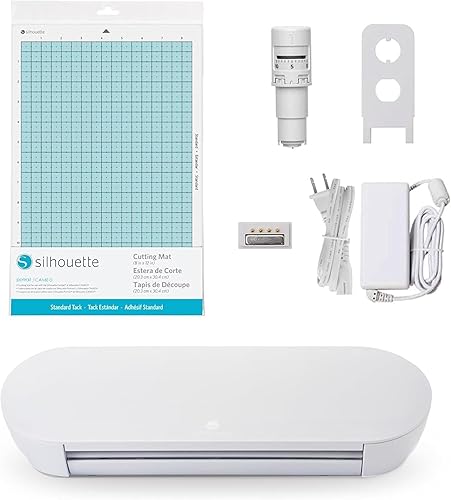
The Cameo 5 Alpha combines a 4-point registration system, AutoBlade and Fast Sketch Mode. Those features make it a strong fit if you plan to cut printed designs or sketch as well as cut.
Silhouette describes the registration system as a way to align printed images, stickers and heat transfers. Your printer, paper size and layout also affect the final result, so plan the whole workflow before choosing a machine.
Fast Sketch Mode draws designs at higher speeds, while Intelligent Path Technology optimizes cut order. The machine includes Studio software, an AutoBlade, cutting mat, sketch pens adapter and 100 designs.
Choose the Cameo for these features when they match your projects, but keep the main decision simple: its wider work area is the reason to pick it over a Portrait.
When is the Portrait 4 the better choice?
Choose the Portrait 4 when a 9 in cutter covers your designs and a narrower machine fits your space. It also has Intelligent Path Technology and electric tool options.
Silhouette describes the Portrait 4 as a redesigned 9 in cutter with a belt-driven chassis and Silhouette New Architecture. Its IPT feature optimizes cut orders, and electric tools expand the options for work beyond cutting and sketching.
The Portrait 4 includes the machine. Check that you have the mat and other accessories needed for your planned projects before ordering.
Labels, small cards and narrow decals can suit its cutting width. If most of your ideas are small, a larger cutter adds workspace you may seldom use.
For paper projects, our guide to Cricut cardstock cutting offers material and layout ideas that apply across electronic cutters.
Who should consider the Cameo 5 Alpha Plus?
Consider the Cameo 5 Alpha Plus if you regularly need up to 15 in of cutting width. Its 25.28 in machine width makes it the widest of these three choices.
It has an active surface of 15 in x 16 ft and includes a Plus standard tack cutting mat, AutoBlade and sketch pens adapter. It also has Fast Sketch Mode and a 4-point registration system.
The extra width makes sense for projects that use it. If your regular designs fit within 9 or 12 in, the Portrait 4 or Cameo 5 Alpha may take less room without forcing you to manage extra capacity.
Before buying, measure the surface where the machine will sit and the path materials need to travel. Long designs need clear space in front of and behind the cutter as material feeds through.
Which machine suits stickers and print-and-cut?
The Cameo 5 Alpha suits sticker layouts that benefit from its wider surface and 4-point registration system. The Portrait 4 can handle smaller designs that fit its 9 in cutter.
The Cameo registration system is designed to align printed images, stickers and heat transfers. Make sure your printer, sheet size and design layout all work together, and plan the project in the software before using a full sheet.
Pick the Portrait if small sticker sheets meet your needs and compact size matters more than a larger work area. For either machine, test your layout with a small design on spare material before moving to a larger or more costly sheet.
How should you set up and care for a Silhouette cutter?
Set up a level, clear work area and check the material path before starting a cut. That simple preparation helps prevent a project from catching on nearby supplies or feeding at an angle.
Place the machine where you can reach its controls and keep the loading area unobstructed. Connect and install the Studio software, then follow its prompts to prepare a design and select the correct material settings.
Keep the blade area and cutting mat free of scraps between projects. Remove small offcuts carefully, and store the mat flat and covered when you are not using it so dust and debris do not collect on its surface.
What common mistakes should you avoid?
The most common buying mistake is choosing by machine name before measuring a real project. A 9 in cutter may be enough for small decals, but a wide design can require multiple sections.
Avoid measuring only the machine body. Check the material size, the cut area, and the space materials need as they move through the machine.
Also confirm which accessories come with your choice. The Cameo 5 Alpha and Alpha Plus include a cutting mat and AutoBlade, while the Portrait 4 includes the machine; budget time to gather anything else your workflow needs.
How much space should you leave around a cutter?
Measure the machine and material path before deciding where it will sit. The machine's width alone won't show whether a long cut can feed without hitting a wall or another object.
The Portrait 4 measures 18 in deep and 9 in wide. The Cameo 5 Alpha is 22.28 in wide and 6.94 in deep, while the Cameo 5 Alpha Plus is 25.28 in wide and 6.94 in deep.
Use painter's tape to mark the footprint and the area where material needs to travel. Check access to power and whether you can reach the controls without moving other supplies.
A machine that stays set up may be easier to use than one you have to unpack for each project. If portability and storage matter most, our best portable cutting machines guide compares options for small craft spaces.
What else should you compare before buying?
Compare material sizes, included accessories and software needs after settling the width question. A feature is useful when it supports a project you actually plan to make.
All three options include Studio software in their product information. The Cameo 5 Alpha and Cameo 5 Alpha Plus include an AutoBlade and sketch pens adapter, while the Portrait 4 offers electric tool options.
The Cameo 5 Alpha Plus includes a Plus standard tack cutting mat, and the Cameo 5 Alpha includes a cutting mat. The Portrait 4 includes the machine, so identify any accessories you need before ordering.
If you're still deciding between machine types, read our craft cutting machine guide for a broader look at manual and electronic cutters. It can help you decide whether a digital machine fits your projects.
Which Silhouette cutter should you choose?
Choose the Portrait 4 for designs within 9 in, the Cameo 5 Alpha for a 12 x 24 in active surface, or the Cameo 5 Alpha Plus for up to 15 in of cutting width. Let your regular project size and workspace settle the choice.
Pick the Portrait 4 if you make smaller designs and want a narrower machine. Choose the Cameo 5 Alpha if you need more room for printed layouts, stickers or wider projects.
Choose the Plus when you need extra width and can make room for its larger body. Skip it if your work rarely exceeds the Cameo 5 Alpha's active surface.
For a closer look at the smaller model, read our Silhouette Portrait 4 review. It covers the Portrait as a standalone choice.
Silhouette Cameo vs Portrait: the quick decision
Choose by the widest project you expect to make often. Extra capacity helps when you have room to set up the machine and feed material through.
If a 9 in cutter covers your work, the Portrait 4 is a direct fit. If you need more, compare the Cameo 5 Alpha's 12 x 24 in active surface with the Cameo 5 Alpha Plus's stated 15 in width.
For a wider view of electronic options, see our best electronic die cutting machines guide.
Frequently asked questions
What is the main difference between Silhouette Cameo and Portrait?
The main difference is cutting width: the Cameo 5 Alpha has a 12 x 24 in active surface, while the Portrait 4 is a 9 in cutter. The Cameo 5 Alpha Plus has a stated cutting width of up to 15 in.
Match those sizes to the projects you make regularly.
Is the Silhouette Portrait 4 good for beginners?
The Portrait 4 may suit a beginner whose projects fit within a 9 in cutting width. It has a narrower body than the Cameo options, and its software supports design work before cutting.
Measure a typical project and check which accessories you need.
Can a Silhouette Cameo cut wider designs than a Portrait?
Yes. The Cameo 5 Alpha has a 12 x 24 in active surface.
The Cameo 5 Alpha Plus has a stated cutting width of up to 15 in, while the Portrait 4 is a 9 in cutter.
Plan large layouts around the machine's usable width.
Which Silhouette machine is easier to fit on a desk?
The Portrait 4 is 9 in wide, compared with 22.28 in for the Cameo 5 Alpha and 25.28 in for the Cameo 5 Alpha Plus. Leave room for the machine and the path materials need as they feed through.
Should I choose Cameo 5 Alpha or Cameo 5 Alpha Plus?
Choose the Cameo 5 Alpha if its 12 x 24 in active surface covers your projects. Choose the Cameo 5 Alpha Plus when you need up to 15 in of cutting width and can fit its wider body.
The Plus includes a Plus standard tack cutting mat.