Silhouette Portrait 4 Review: Worth It? (October 2026)
The Silhouette Portrait 4 suits small vinyl and paper projects if you want a 9-inch cutter with cutting and sketching options. Its narrower width favors compact work, while a Cameo model offers a larger active area.
On this page (7 sections)
- What does the Silhouette Portrait 4 review find?
- What can you make with a 9-inch cutter?
- How do the Portrait 4 and alternatives compare?
- What should you know about tools and software?
- Is the Portrait 4 a good choice for beginners?
- What are the main limits to consider?
- How should you choose between the Portrait 4 and Cameo?
The Silhouette Portrait 4 is a 9-inch electronic cutter for compact projects that supports cutting and sketching, with electric tool options. Its smaller format suits labels, cards and short vinyl designs, while larger projects may call for a wider machine.
We compared its features with compact alternatives and the larger Silhouette Cameo 5 Alpha. Our score weighs specs, features and buyer feedback against what you're shopping for.
What does the Silhouette Portrait 4 review find?
The Silhouette Portrait 4 stands out for its 9-inch format, IPT and electric tool options. It suits smaller work rather than wide layouts.
Silhouette Portrait 4: Best for compact Silhouette projects
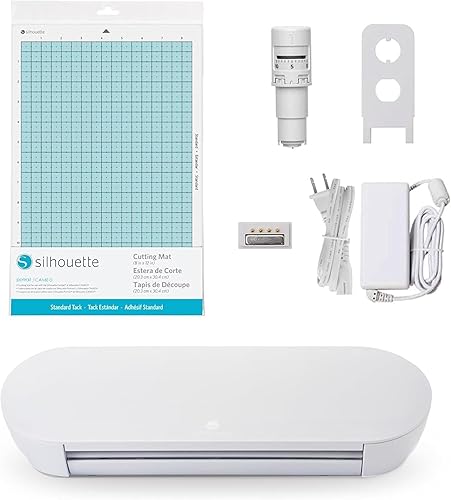
- 9-inch cutting machine
- IPT Technology
- Electric tool options
- Studio software
The Silhouette Portrait 4 is a 9-inch cutter with IPT and electric tool options. Its compact format suits smaller projects, while its width limits the size of designs you can cut.
Pros
- 9-inch format suits smaller designs
- IPT optimizes cut orders
- Electric tool options expand beyond cutting and sketching
Cons
- Narrower working area than the Cameo 5 Alpha
- Check tool and mat compatibility for your planned projects
Silhouette describes the Portrait 4 as a full redesign with a belt-driven chassis. It includes Studio software, and Silhouette says the machine is quieter and more precise than the earlier Portrait design.
Silhouette says IPT optimizes cut orders to reduce tearing or rounded corners on layered cuts and sharp angles. These are the brand's stated benefits, and results may vary by material, blade and project.
Who should consider the Silhouette Portrait 4?
The Portrait 4 may fit if your projects fit within a 9-inch cutter and you want Silhouette Studio with cutting and sketching. Electric tool options may also suit projects beyond standard cuts.
You may prefer a wider machine if you often make large decals, signs or full-width projects. Compare the formats in our Silhouette Cameo vs Portrait size guide before choosing.
What can you make with a 9-inch cutter?
A 9-inch cutter can make small decals, labels, card elements and other designs sized for its working area. The finished size also depends on the tool, material and compatible setup.
Leave room around a design for placement and trimming. If you regularly make wider graphics, arranging and applying multiple small cuts may take more time than using one larger cut.
The Cricut Joy 2 Essential and Likcut S501 have 4.5-inch cutting widths. Read our Cricut Joy 2 review if your projects mostly involve small cards, stickers and labels.
The Portrait 4 is compatible with an ES Mat, but the range of compatible mat sizes is not specified here. Check Silhouette's current compatibility details for the mat and project dimensions you need.
How do the Portrait 4 and alternatives compare?
The Portrait 4 is wider than the two 4.5-inch alternatives, while the Cameo 5 Alpha has a larger active area. Your fit depends on whether small projects or wider layouts are more common.
| Machine | Stated cutting area or width | Notable features |
|---|---|---|
| Silhouette Portrait 4 | 9-inch machine | IPT, Studio software, electric tool options |
| Silhouette Cameo 5 Alpha | 12 x 24-inch active area | AutoBlade, print and cut registration system |
| Cricut Joy 2 Essential | 4.5-inch cutting width | 75+ materials, bundle supplies |
| Likcut S501 Vinyl Cutter | 4.5-inch cutting width | Bluetooth and USB, cutting and drawing |
Silhouette Cameo 5 Alpha: Best for wider Silhouette projects

- 12 x 24-inch active area
- 4-point registration system
- AutoBlade
- Studio software
The Cameo 5 Alpha has a 12 x 24-inch active area and a 4-point registration system for print and cut alignment. Its larger area suits wider designs.
Pros
- Larger active area for wider designs
- 4-point registration system supports print and cut alignment
- Includes AutoBlade, cutting mat and Studio software
Cons
- Larger active area needs more workspace
- Its capacity may exceed what small labels and cards require
The Cameo 5 Alpha is the wider Silhouette option, with a 12 x 24-inch active area. For a fuller comparison with another full-size machine, see Silhouette Cameo 5 vs Cricut Maker 4.
Cricut Joy 2 Essential: Best for everyday cards and labels

- 4.5-inch cutting width
- Works with 75+ materials
- Bluetooth connection
- Essential Bundle supplies
The Cricut Joy 2 Essential is a compact cutter for cards, labels, decals and stickers. Its bundle includes supplies for up to 35 projects, and its 4.5-inch cutting width suits smaller designs.
Pros
- Compact format for small spaces
- Works with 75+ materials
- Bundle includes tools and materials for up to 35 projects
Cons
- 4.5-inch cutting width is narrower than the Portrait 4
- Design Space requires a compatible device and high-speed internet
The Cricut Joy 2 Essential has a 4.5-inch cutting width and comes with bundle supplies for up to 35 projects. Design Space works over Bluetooth with a compatible phone, tablet or computer and requires high-speed internet.
Likcut S501 Vinyl Cutter: Best for AI-assisted sticker ideas

- 4.5-inch cutting width
- Bluetooth 5.0 and USB 2.0
- Cutting and drawing
- Design store
The Likcut S501 has Bluetooth and USB connectivity, a design store and voice or text prompts for creating sticker designs. Its 4.5-inch width suits small projects.
Pros
- Bluetooth and USB connection options
- Supports cutting and drawing
- Voice and text prompts can create sticker designs
Cons
- 4.5-inch width limits the size of a single design
- Uses a different design workflow from Silhouette Studio
The Likcut S501 has a 4.5-inch cutting width, voice and text prompts for sticker designs, and Bluetooth and USB connections.
What should you know about tools and software?
The Portrait 4 supports cutting and sketching, with electric tool options, and includes Studio software. Check which tools are included or sold separately for your intended projects before you buy.
The machine is named as an included component, while the product title mentions Studio software. Electric tools are described as options, so check which compatible accessories your projects require.
Software affects day-to-day use as much as cutting width. If you already have designs or a preferred workflow, check file support, device compatibility and whether the features you need are available in the software version you plan to use.
For a broader look at machine types and software trade-offs, read our electronic die cutting machine guide.
Is the Portrait 4 a good choice for beginners?
The Portrait 4 may suit a beginner with specific small projects in mind who is willing to learn Silhouette Studio. Its 9-inch format can keep early projects manageable, but check material and tool compatibility first.
Start with one material and a simple design, then follow the machine and tool instructions for setup. This can help narrow down what to adjust if a cut needs changes.
If you want a machine bundled with materials for starter projects, the Cricut Joy 2 Essential includes supplies for up to 35 projects. Its narrower 4.5-inch width is the trade-off.
What are the main limits to consider?
The main limit is working width: the Portrait 4 is a 9-inch cutter, while the Cameo 5 Alpha has a 12 x 24-inch active area. Its compact format may constrain the size and layout of your designs.
Silhouette's product information does not specify every compatible material, tool, mat size or device requirement. Check the brand's current guidance for the project you want to make, especially if it depends on an electric tool or a specialized material.
The included component is the machine. Confirm whether you need to buy a mat, blades, tools or materials separately for your setup.
How should you choose between the Portrait 4 and Cameo?
Choose the Portrait 4 if a 9-inch width meets your usual project needs and you value its Silhouette workflow and tool options. Choose the Cameo 5 Alpha if you need its 12 x 24-inch active area.
For smaller everyday crafts, the Cricut Joy 2 Essential and Likcut S501 both have 4.5-inch cutting widths. Their app and connectivity features differ, so compare those with your preferred design process.
If you are still deciding which machine type fits your plans, use our craft cutting machine guide to compare formats and common projects. Pick the Portrait 4 for compact Silhouette work, and consider the Cameo when your designs need more width.
Frequently asked questions
What is the Silhouette Portrait 4 best for?
The Portrait 4 suits smaller vinyl and paper projects that fit within a 9-inch cutter. It supports cutting and sketching, with electric tool options and IPT for optimized cut orders.
Check tool and mat compatibility for your planned projects.
Is the Silhouette Portrait 4 wider than the Cricut Joy 2?
Yes. The Portrait 4 is a 9-inch cutting machine, while the Cricut Joy 2 has a 4.5-inch cutting width.
That gives you more width for a single design, though both suit compact projects compared with the Cameo 5 Alpha's 12 x 24-inch active area.
Should I choose the Portrait 4 or Cameo 5 Alpha?
Choose the Portrait 4 for smaller Silhouette projects that fit its 9-inch format. The Cameo 5 Alpha has a 12 x 24-inch active area for wider designs and longer layouts.
Consider your typical project size and available workspace.
Does the Portrait 4 cut fabric?
The Portrait 4's product information names fabric as print media, but does not specify which fabric types or tool setups are suitable. Check Silhouette's current material guidance and instructions for the blade, mat and fabric you plan to use before cutting.


