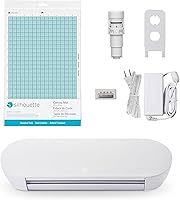
Cricut Joy Xtra vs Silhouette Portrait 3: Which Is Better? (November 2026)
Pick the Cricut Joy Xtra for a compact, beginner-friendly cutter with a wide material range; pick the Silhouette Portrait 3 for a mat-based setup on standard letter paper. In this cricut joy xtra vs silhouette portrait 3 comparison, your desk space, material list and software patience decide it.
On this page (9 sections)
- Cricut Joy Xtra vs Silhouette Portrait 3: the quick verdict
- The two machines side by side
- Which machine fits a small desk?
- Which one covers the materials you cut?
- Print-Then-Cut and full-color stickers
- Software: Design Space vs Silhouette Studio
- Vinyl projects and starter kits
- Which cutter should you buy?
- The verdict: cricut joy xtra vs silhouette portrait 3
Pick the Cricut Joy Xtra for a compact, beginner-friendly cutter with a wide material range; pick the Silhouette Portrait 3 for a mat-based setup on standard letter paper. The cricut joy xtra vs silhouette portrait 3 choice really comes down to your desk space, the materials you cut and how much software you want to learn.
The Joy Xtra cuts, draws and foils, works with 50+ materials and runs on the free Design Space app. The Portrait 3 is a mat-fed Silhouette cutter that pairs with the 8 x 12 inch Silhouette mat and its 1-inch grid.
One is small and app-driven, the other is a mat-based vinyl and paper cutter.
Neither is a full-size workshop machine. If you need bigger cuts, look at the Cricut Joy Xtra vs Explore 5 comparison before you commit.

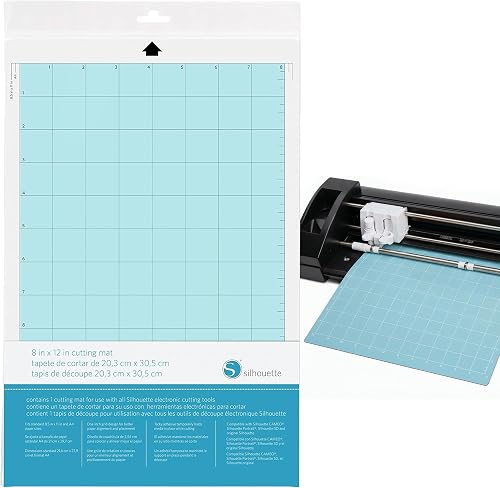 Best mat for letter paper
Silhouette Cutting Mat for Portrait Machines
Cricut Joy Xtra vs Silhouette Portrait 3: the quick verdict
The Cricut Joy Xtra wins overall for most people, because it's smaller, easier to start with and covers more material types in one machine. The Silhouette Portrait 3 is the better fit if you already plan projects around standard letter paper and mats.
The Joy Xtra is the higher-scored product here, at 8.6 against 8.4 for the Portrait 3. It earns that edge from the free Design Space app, the 50+ material range and the Print-Then-Cut feature for full-color stickers.
The Portrait 3's strength is its mat workflow. The 8 x 12 inch Silhouette mat holds 8.5 x 11 and A4 paper with a 1-inch grid, which suits card making, scrapbooking and small vinyl jobs that start from a sheet of paper.
If you want a cutter for a tiny craft corner and mostly vinyl, cards and stickers, the Joy Xtra is the buy. If you want to feed standard paper through a mat and use Silhouette's design tools, the Portrait 3 is the one.
The two machines side by side
The table below sets the two cutters against each other on size, materials, mats, software and project type. Use it to spot the difference that matters for your own projects.
| Feature | Cricut Joy Xtra | Silhouette Portrait 3 |
|---|---|---|
| Best for | Small desks and mixed materials | Letter-paper and mat-based projects |
| Score | 8.6 | 8.4 |
| Size and space | Compact, fits small spaces | Mat-fed, needs mat clearance |
| Materials | 50+ including vinyl, HTV, cardstock | Vinyl and paper with the right mat |
| Mat | Optional for some materials | Standard 8 x 12 inch mat |
| Cut, draw, foil | Cuts, draws, foils | Cuts and draws |
| Print-Then-Cut | Yes, with most inkjet printers | Not a named feature |
| Software | Free Design Space app | Silhouette Studio |
| Best project types | Stickers, cards, decals, T-shirts | Cards, scrapbooking, small vinyl |
The score weighs specs, features and how well each machine fits what a cutter buyer wants. Scores are set from the product data and the job each machine is built to do.
Which machine fits a small desk?
The Cricut Joy Xtra is the smaller machine and the better fit for a cramped desk, because it's built to fit in small spaces. The Portrait 3 needs room for its mat to feed in and out as it cuts.
Cricut calls the Joy Xtra the fits-in-any-space machine. It weighs about 250 g, so it's easy to move aside when the desk doubles as a work table.
A small cutter that you can lift with one hand is easier to live with in a shared room.
The Portrait 3 uses a mat-based feed. The 8 x 12 inch mat has to sit in the machine and pass through as it cuts.
That means clear space in front of and behind the cutter, not just room for the cabinet itself.
Measure your desk before you order either one. Tape a paper outline at the footprint, then check whether a mat could slide through without hitting the wall, a monitor or a stack of supplies.
If your space is tight, the Cricut Joy 2 review is also worth a read for an even smaller option.
Clearance for the mat matters more than the cabinet
The mat is what makes the Portrait 3 feel bigger than it looks. A sheet-fed machine needs working space, not just storage space.
If your desk sits against a wall, think about pulling the cutter forward each time you cut. That routine gets old quickly in a small room.
The Joy Xtra's compact body leaves more of the desk free when it's not in use.
Which one covers the materials you cut?
The Cricut Joy Xtra covers more material types in one machine, including vinyl, iron-on HTV, cardstock and stickers. The Portrait 3 handles vinyl and paper, with results that depend on using the right mat.
Cricut lists 50+ materials for the Joy Xtra. That range covers the popular project types: vinyl decals, custom T-shirts with HTV, cards and full-color stickers.
The machine cuts, draws and foils, so one tool handles the outline and the decoration.
The Portrait 3 is a vinyl and paper cutter. Its mat grips hold the material in place while the blade moves.
For paper projects, the Silhouette mat's 1-inch grid helps you align 8.5 x 11 and A4 sheets so the cut lands where you want it.
Material choice also affects your running costs. Vinyl, HTV and cardstock get used up quickly, so plan to restock whichever material you cut most.
The Joy Xtra's wider range means fewer machines to buy later if your projects change.
Matching mats to materials
Grip strength matters on both machines. The Silhouette mat uses a standard grip that holds paper, vinyl and other materials without slipping.
On the Silhouette side, the ecraft 12 x 12 pack adds LightGrip for paper and thin vinyl and StrongGrip for thick cardstock and foam.
That mat is the practical partner for the Portrait 3 if you cut cards, scrapbook paper or small vinyl sheets. It's a single mat, so heavy users will want a spare.
Print-Then-Cut and full-color stickers
The Cricut Joy Xtra can print full-color designs on an inkjet printer and then cut them out, which makes it the better machine for stickers and photo cards. The Portrait 3 focuses on cutting shapes you design, not printing them.
Print-Then-Cut is the feature that separates these two for sticker makers. You print the design on your own inkjet printer, load the sheet, and the Joy Xtra cuts around the printed image.
The result is a full-color sticker with a clean edge.
The Portrait 3 can cut sticker sheets, but you supply the printed artwork yourself. That's fine if you already print at home or order printed sheets.
It's more work if you want the machine to handle the whole sticker process.
If stickers are the main reason you're buying a cutter, the Joy Xtra's Print-Then-Cut is the stronger feature. The bundled Digital Content edition adds 30 bonus images in Design Space to get you started.
That bundle also includes a fine-point blade, a pen, a mini weeder and a practice cut's worth of materials. It's the version to buy if you want everything in one order.
Software: Design Space vs Silhouette Studio
The Cricut Joy Xtra is easier to start with because Design Space is a free, guided app, while the Portrait 3 leans on Silhouette Studio and its own design workflow. Your comfort with design software is a real deciding factor.
Design Space includes 3,000+ images and 100+ fonts free out of the box. It runs on desktop and mobile, and guided design flows walk you through a project step by step.
New users can make a card or a decal without prior design experience.
Silhouette Studio is the Portrait 3's companion software. It's a capable design tool, but the workflow asks more of you: designing shapes, setting cut lines and managing the mat.
Crafters who like control often prefer it.
If you want to sit down and cut something in the first hour, the Joy Xtra is the friendlier machine. If you enjoy building a design from scratch and want deep control over cut paths, the Portrait 3 rewards that patience.
Subscription and library differences
Cricut's free library is generous, and the optional Cricut Access subscription opens the full 1.5 million+ image library. The bundle also includes a free trial for new subscribers.
Silhouette Studio has its own paid tiers for advanced features. Neither machine forces a subscription to make a basic cut, so you can start free on both.
Vinyl projects and starter kits
The Cricut Joy Xtra is the easier machine for vinyl decals and iron-on projects, because the starter kit bundles the vinyl, mat and transfer tape you need. The Portrait 3 works fine for vinyl, but you'll assemble the supplies yourself.
The Joy Xtra Vinyl Starter Kit adds a StandardGrip mat, a Smart Vinyl sampler, a roll of transfer tape and a 5-piece tool set. That's the practical set for your first decals: cut the vinyl, weed it with the tools and transfer it with the tape.
Silhouette users build the same kit around the Portrait 3 and the 8 x 12 inch mat. The ecraft 12 x 12 pack is a Cameo-sized set, so it's the wrong size for the Portrait 3's mat feed.
Check the mat size against your machine before ordering.
How much vinyl do you actually need?
Start with a sampler rather than a large roll. You'll learn your blade depth and weed settings on small pieces, then buy full rolls once you know what you use most.
Which cutter should you buy?
Buy the Cricut Joy Xtra if you want one small machine for cards, stickers, decals and T-shirts with the least setup fuss. Buy the Silhouette Portrait 3 if you prefer mat-based cutting on letter paper and want Silhouette Studio's design control.
Choose the Joy Xtra when:
- Your craft space is small and the machine has to fit on a desk or shelf.
- You want to cut vinyl, HTV, cardstock and stickers on one machine.
- Full-color stickers with Print-Then-Cut are on your project list.
- You'd rather learn a guided app than a full design program.
Choose the Portrait 3 when:
- You cut mostly paper, cards and scrapbook pages from 8.5 x 11 or A4 sheets.
- You want the control of Silhouette Studio and don't mind the learning curve.
- You already own Silhouette mats and supplies.
- Your desk has room for the mat to feed through.
If you're still weighing Silhouette against Cricut more broadly, our Silhouette vs Cricut buying guide compares the two brands' machines and software. And if you're leaning toward Silhouette, the Silhouette Portrait 4 review covers the newer model in the same family.
The verdict: cricut joy xtra vs silhouette portrait 3
For most people, the Cricut Joy Xtra is the cutter to buy. It's compact, it covers 50+ materials, it handles Print-Then-Cut for stickers, and Design Space makes the first project easy.
The 8.6 score reflects that broad fit for a typical home crafter.
The Silhouette Portrait 3 is still the right machine for a specific buyer. If your projects start from standard letter paper, you like working on a mat and you want Silhouette Studio's control, it earns its place.
The 8 x 12 inch Silhouette mat makes that paper workflow smooth.
So the cricut joy xtra vs silhouette portrait 3 call comes down to this: pick the Joy Xtra for a small desk and mixed materials, and pick the Portrait 3 for mat-based paper projects and design control. Either way, buy the mats and supplies that match the machine you choose.
Frequently asked questions
Can the Cricut Joy Xtra cut the same materials as the Silhouette Portrait 3?
The Joy Xtra works with 50+ materials including vinyl, iron-on HTV and cardstock. The Portrait 3 is also a vinyl and paper cutter.
Material support depends on blade and mat choices, so compare the exact material you plan to cut before you buy.
Does the Silhouette Portrait 3 need a cutting mat?
Yes. The Portrait 3 cuts on a mat, and the 8 x 12 inch Silhouette mat holds standard 8.5 x 11 and A4 paper with a 1-inch grid.
The Joy Xtra can use its own mat for some materials but also cuts Cricut Smart Materials without one.
Which machine takes up less desk space?
The Cricut Joy Xtra is the smaller, lighter machine and is built to fit in small spaces. The Portrait 3 is a mat-fed cutter that needs room for the mat to feed in and out.
Measure your desk before ordering either one.
Can I use Silhouette mats in a Cricut machine?
No. The Silhouette Portrait mat is sized for Silhouette machines, and ecraft's 12 x 12 mats fit Silhouette Cameo models.
Cricut machines use their own mats and Smart Materials.
Buy mats matched to your machine brand to avoid feed and grip problems.